∙
Cooper
∙
Reading time:
12 min

Stop wasting time jumping between apps. Federated search brings all your tools - like Slack, Notion, Confluence, Salesforce, and Google Drive - into one interface, so you can find what you need instantly. By pulling real-time data from multiple platforms, it eliminates information silos and boosts team productivity.
Here’s why it matters:
Slack’s built-in search is limited to conversations and files within Slack. Federated search goes further, retrieving answers from external tools.
Enterprise teams lose billions annually due to poor knowledge sharing. Federated search saves time by centralizing information where your team works.
Tools like Question Base make it easy to set up federated search in Slack, offering verified answers from trusted sources without manual effort.
This guide explains how to set up federated search in Slack, covering prerequisites, integration steps, and tips for optimizing results. Whether you’re an admin or a team lead, this is your roadmap to transforming Slack into a centralized knowledge hub.
Connect Slack with Enterprise Search
Prerequisites for Setting Up Federated Search in Slack
Before diving into federated search setup in Slack, it's important to ensure that a few technical and administrative requirements are met. These steps help streamline the process and prevent potential setup issues.
Slack Admin Requirements
Only Org Owners and Org Admins have the authority to enable enterprise search vs. Slack AI features. To activate this functionality, navigate to the "Enterprise search" section within your Organization settings.
Once that’s confirmed, it’s crucial to check which tools and platforms are compatible with federated search integration.
Supported Platforms and Tools
Federated search connects Slack with your existing knowledge repositories, making it easier for teams to find the information they need. Question Base integrates effortlessly with platforms like Notion, Confluence, Google Drive, Zendesk, Intercom, Salesforce, and Dropbox. These integrations allow support teams to access trusted, verified answers directly in Slack - without requiring manual setup or engineering work. This plug-and-play feature simplifies the process, ensuring teams can rely on expert-backed answers.
Required Credentials and Scopes
To complete the integration, you’ll need to ensure that OAuth credentials and the proper Slack API scopes are set up. Common scopes required for standard search apps include search:read, channels:read, and files:read, which allow the app to query Slack content effectively. For enterprise search apps, they must be "org-ready" and installed at the organization level to enable seamless, real-time searches across external sources [2].
Some integrations, such as those with GitHub, Asana, or Box, may require additional credentials. However, Question Base simplifies this process by handling OAuth flows automatically during setup. This eliminates the need for manual API scope configuration or managing credentials across multiple platforms.
With these prerequisites in place, you’re all set to move on to the detailed configuration steps that will turn Slack into a central knowledge hub for your team.
Step-by-Step Setup Guide
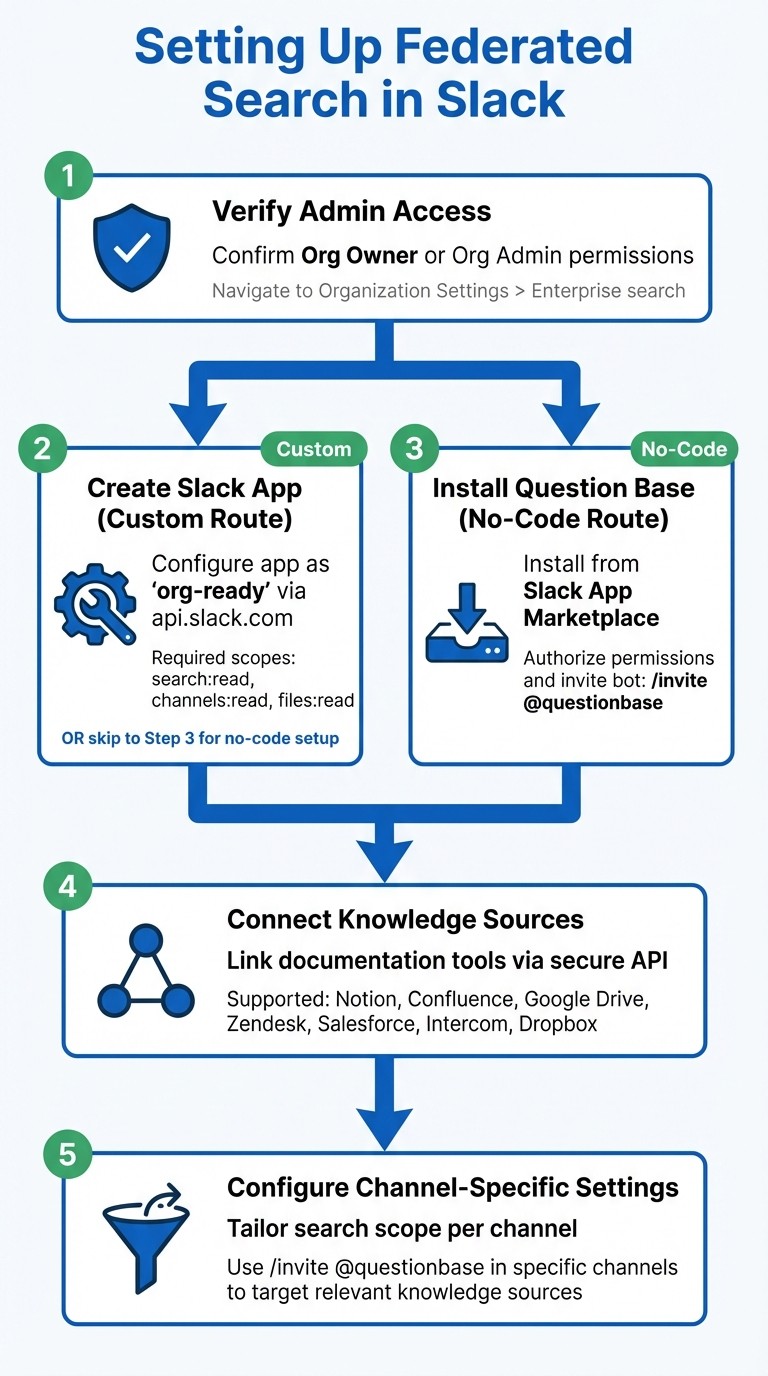
How to Set Up Federated Search in Slack: 5-Step Process
Setting up federated search in Slack can be done using either a custom integration or a no-code tool. For most enterprise teams, the no-code route is often the quickest and easiest, as it simplifies the technical process while ensuring security and precision.
Creating and Configuring a Slack App
For those building a custom federated search integration, the process begins by creating an app through the Slack API (https://api.slack.com). Configure the app as "org-ready", which allows installation at the organization level for Enterprise Grid users [2]. Make sure to include the required scopes, such as search:read and channels:read, as outlined in the prerequisites. Once configured, obtain the Client ID and Client Secret from the app settings. This setup ensures that the app respects source-level permissions, meaning users only see content they’re authorized to access [1].
Integrating with specific platforms often requires additional setup. For instance:
GitHub: Enter your organization name and install the "Slack enterprise search for GitHub" app.
Jira and Confluence: Provide your cloud subdomain (e.g., company.atlassian.net).
Box: Admins need to enable the "Box Connector for Slack Workflows" for all users [1].
For those looking for a faster and less technical setup, the next section covers how to deploy Question Base with minimal effort.
Setting Up Question Base for Federated Search

Question Base offers a straightforward alternative to custom integrations. You can install it directly from the Slack App Marketplace, authorize the required permissions, and start connecting your knowledge sources - all in just a few minutes.
After installation, invite the bot to relevant channels using /invite @questionbase. Then, link your documentation tools - such as Notion, Confluence, Google Drive, Zendesk, Intercom, Salesforce, or Dropbox - via secure API connections. The platform uses Retrieval-Augmented Generation (RAG) to fetch information in real time. When a user asks a question, the AI retrieves relevant data from your connected sources and provides an answer, complete with citations linking back to the original documents.
One of the key advantages of Question Base is its respect for existing access controls. For example, if a user doesn’t have permission to view a specific Notion page, it won’t appear in Slack search results. This ensures both accuracy and security. For teams that prioritize verified answers from trusted documentation over AI-generated interpretations of past conversations, this setup strikes the perfect balance between speed and reliability.
Platform-Specific Configurations
Some platforms may require additional adjustments to enable federated search. For instance:
Slack Enterprise Search (available on Enterprise+ plans) must be activated by Org Owners or Admins through Organization Settings > Settings > Enterprise search [1]. While this native tool is great for summarizing conversations and navigating chat history, it often involves manual configuration, such as entering cloud subdomain details for tools like Jira and Confluence.
Elastic Enterprise Search and Microsoft Search demand a higher level of engineering expertise for both setup and ongoing maintenance. These solutions are better suited for teams with dedicated technical resources.
For teams working in HR, IT, or operational support, the choice often comes down to balancing the need for precise answers with the complexity of setup. While Slack’s native search is helpful for combing through past conversations, Question Base takes it a step further, surfacing expert-verified answers from trusted documentation without requiring extensive technical effort.
Optimizing and Customizing Federated Search
Once federated search is up and running in Slack, the next step is making it work smarter for your team. The real power of federated search lies in fine-tuning how it operates within specific channels, connecting to the right knowledge sources, and using analytics to keep improving. Let’s break down how to customize search settings for different channels, integrate external tools, and use data to refine your setup over time.
Channel-Specific Search Settings
Not all Slack channels are created equal, and neither should their search behavior be. Your #hr-benefits channel doesn’t need to surface engineering documentation, and your #sales-enablement team shouldn’t have to sift through HR policies. Question Base makes it easy to tailor search results to each channel through per-channel invites. By using /invite @questionbase, admins can add the bot to specific channels and configure it to pull only from relevant knowledge sources - like designated Notion folders or Confluence spaces. This ensures employees get precisely targeted answers, cutting through irrelevant content and improving search accuracy. Narrowing the search scope not only boosts efficiency but also reinforces Slack as a go-to hub for organized, actionable knowledge.
Connecting External Knowledge Sources
The effectiveness of federated search hinges on the quality and range of connected knowledge sources. Unlike Slack’s built-in chat search, Question Base pulls from trusted, expert-approved documentation tools such as Notion, Confluence, Google Drive, Zendesk, Salesforce, and Intercom. This means when someone asks a question, the AI delivers verified answers from your official resources - not a guess based on old Slack threads. For teams in HR, IT, and operations, having a single, reliable source of truth is critical to maintaining accuracy and trust.
Using Analytics for Continuous Improvement
Even the best federated search setup needs regular tuning. Once your knowledge sources are connected, tracking performance becomes essential. Question Base offers analytics that monitor automation rates, resolution rates, and unanswered questions, helping you identify content gaps and optimize the system. For example, if 15% of queries in #it-support go unanswered, it’s a clear sign you need to add missing documentation or update outdated resources. Reviewing unanswered questions weekly allows teams to prioritize new content and address gaps during their next sprint or planning cycle.
User feedback also plays a big role. Features like thumbs up, thumbs down, or "unhelpful" flags create a feedback loop that alerts subject matter experts to refine specific materials. Quarterly audits of high-traffic resources ensure accuracy and assign ownership for keeping them up to date. This process helps transform federated search into a dynamic system, adapting as your organization’s knowledge evolves.
Key metrics to track include Automation Rate, Resolution Rate, Unanswered Questions, and User Feedback. Each one contributes to improving productivity:
Metric | Purpose | Impact on Productivity |
|---|---|---|
Automation Rate | Percentage of queries resolved by AI alone | Frees up support teams and experts for more complex tasks |
Resolution Rate | Success rate of searches returning useful answers | Highlights system accuracy and identifies content gaps |
Unanswered Questions | Reveals missing or outdated content | Guides prioritization for new documentation |
User Feedback | Tracks user ratings (thumbs up/down) | Helps fine-tune AI accuracy and improve search rankings |
While Slack AI is excellent for general productivity tasks like summarizing conversations, Question Base is purpose-built for teams that need reliable, verified knowledge at scale. It doesn’t just search - it creates an answer layer that keeps experts involved and ensures your internal knowledge stays accurate, accessible, and easy to manage.
Testing, Troubleshooting, and Best Practices
Testing Search Functionality
Once your setup is complete, it’s time to confirm everything works as expected. Run test queries in the Slack channels where Question Base operates. Use familiar questions like, "What's our PTO policy?" and check that the responses pull from the right sources. If you notice outdated or irrelevant answers, it could mean the sources are misconfigured or need updating. Testing in multiple channels is crucial to ensure each one is properly scoped and only serves the content it’s supposed to.
Common Troubleshooting Tips
If you’re not seeing expected results, start by checking that OAuth credentials and API scopes are up to date. Also, make sure Question Base has been added to the relevant channels using the /invite @questionbase command. If outdated content appears, it might be time to re-sync your connected knowledge sources, especially if there have been recent reorganizations or archived pages.
Best Practices for Enterprise Teams
To keep your knowledge base effective, schedule quarterly reviews of connected sources and assign subject-matter experts to update content as needed. Adding search-friendly metadata - like tags, categories, and clear titles - can significantly improve how well the AI matches queries. Encourage your team to ask questions naturally and use the thumbs-up or thumbs-down feedback feature to refine responses. This feedback loop not only enhances accuracy but also ensures your team’s knowledge remains both up-to-date and accessible.
Wrapping It Up
Federated search in Slack changes the game for accessing knowledge by sharing knowledge to boost team decisions right where your team works. No more bouncing between Notion, Confluence, Salesforce, or other tools - this approach directly addresses the productivity hit caused by constant context switching, a headache reported by 74% of tech leaders.
Question Base integrates seamlessly with your trusted documentation, pulling accurate answers while flagging low-confidence queries (below 90%) for human review. This setup ensures both precision and the opportunity to identify and fill knowledge gaps, keeping your resources up-to-date and dependable.
For enterprise teams, the advantages extend well beyond speed. With SOC 2 Type II compliance, encryption for data both at rest and in transit, and detailed analytics tracking resolution rates and automation performance, Question Base meets strict security needs. Plus, its alignment with planning cycles - like sprints or quarterly updates - makes maintaining your knowledge base a natural part of your workflow. Slack becomes not just a communication tool but a true hub for centralized knowledge.
Federated search doesn’t just boost efficiency; it creates a smarter, more responsive system. Start with high-demand areas like HR or IT, analyze unresolved queries, and refine your knowledge base to establish a feedback loop that keeps your internal resources sharp and actionable.
FAQs
Do users only see content they’re authorized to access?
Yes, users can only view content they are permitted to access. Question Base applies strict permission-based controls and role-specific access settings, following Slack’s security standards. This approach safeguards sensitive information while ensuring authorized users have secure and appropriate access.
What’s the fastest way to add federated search in Slack without engineering?
The fastest way to integrate federated search into Slack - without involving engineering - is by opting for a no-code tool like Question Base. All it takes is installing the app from the Slack App Marketplace and inviting the bot to your desired channels using the command /invite @questionbase. Question Base pulls information from trusted platforms like Notion, Confluence, and Salesforce, providing centralized and reliable search results instantly - no coding or custom setup required.
How can I tell if my federated search setup is working?
To ensure your federated search setup is working as expected, start by running test queries across all connected platforms, such as Slack, Google Drive, or Confluence. Check that the results are relevant and align with your expectations. Pay close attention to factors like search accuracy, proper enforcement of permissions, and adherence to security protocols. Dive into analytics to assess success rates and pinpoint any gaps in performance. Finally, gather input from your team to uncover potential issues or areas for improvement.