∙
Cooper
∙
Reading time:
15 min

Repetitive questions waste time and money. In companies with over 1,000 employees, repeated internal queries and scattered knowledge cost over $2 million annually in lost productivity. AI agents in Slack solve this by delivering instant, accurate answers directly within Slack channels - where employees already work. These tools reduce time spent searching for information, automate repetitive tasks, and improve team efficiency.
Key insights from this guide:
40% of internal questions are repeats, but AI agents resolve 35% of them automatically in seconds.
Teams save 33% of their daily time by automating workflows and reducing context-switching.
AI tools like Question Base connect Slack to trusted documentation (e.g., Google Drive, Confluence) for verified answers.
Slack AI agents are transforming how enterprises manage knowledge and workflows, enabling faster responses and better collaboration. Whether your focus is answering HR or IT queries, automating sales workflows, or boosting individual productivity, this guide outlines practical steps to implement the right AI tools for your team.
Build a Slack AI Agent That Answers Questions (Step-by-Step Tutorial)
How Cross-Functional Teams Use Slack AI Agents
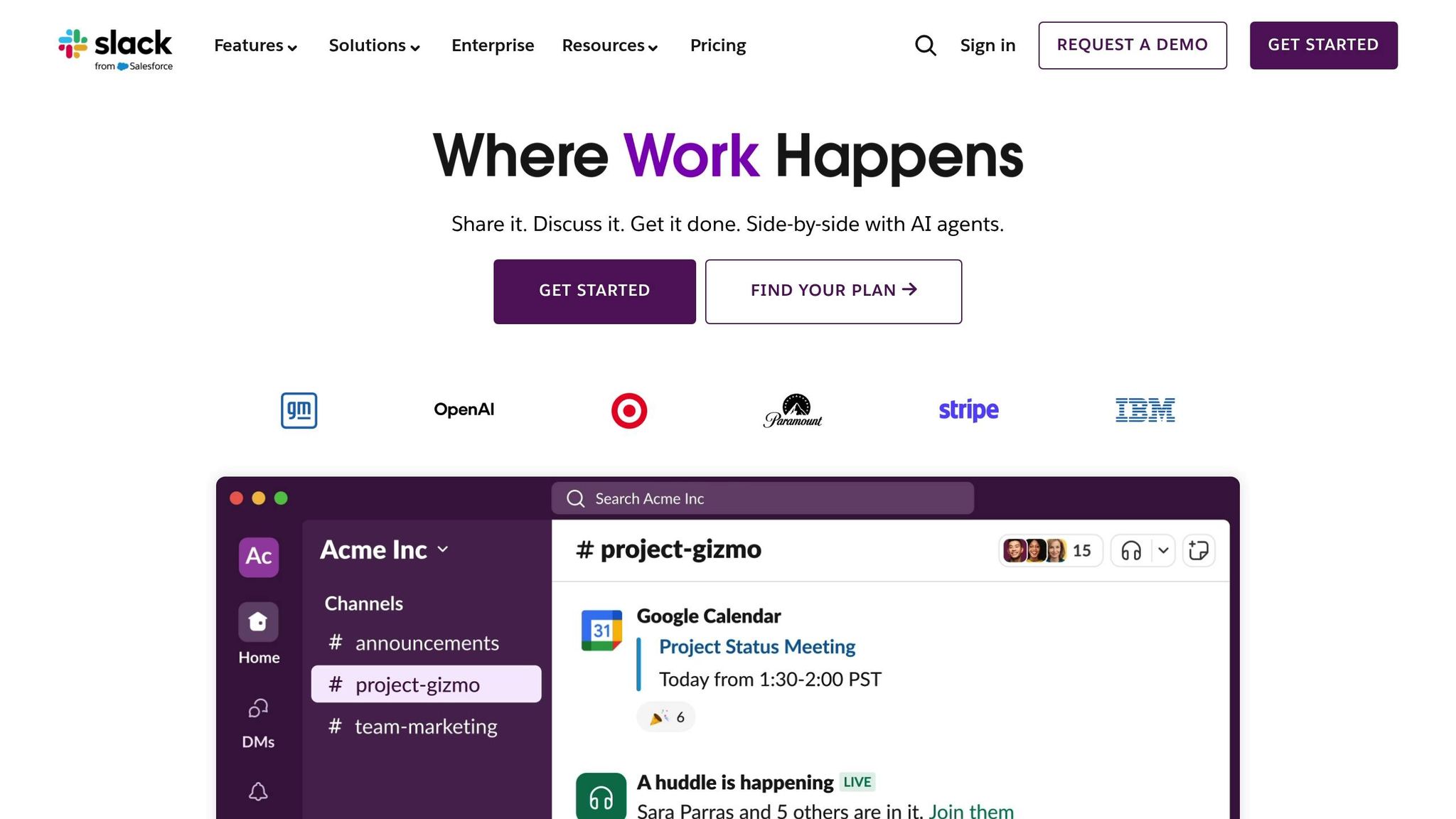
In many enterprises, knowledge is scattered across platforms like Google Drive, Confluence, Salesforce, Notion, and Zendesk. Yet, when employees have questions, they often turn to Slack. According to Gartner research cited by Slack, 47% of knowledge workers struggle to find the information they need to perform their jobs effectively. Slack AI agents address this challenge by delivering answers, workflows, and productivity tools directly within Slack channels - where teams are already collaborating. This eliminates the need for employees to jump between apps or wait for responses, enabling real-time support and streamlining cross-functional processes. The result? Faster responses and tailored, department-specific assistance.
Answering Internal Questions Faster Across Departments
Slack serves as a central communication hub, and Question Base enhances its capabilities by connecting enterprise documentation to real-time answers. Once installed from the Slack App Marketplace and linked to your documentation tools, employees can simply @mention the agent in channels like #ask-hr or #ask-it. They’ll receive verified answers to questions about benefits, device provisioning, expense policies, or office operations - all without needing to wait for a human to respond.
This process reduces response times from minutes or hours to mere seconds, ensuring that answers are always aligned with the latest approved documentation. For companies in the U.S. managing high-demand topics like healthcare benefits, PTO policies, security protocols, or compliance standards, this shift to instant, self-service support is a game-changer.
"Since we started using Question Base, we don't spend any time looking up our procedures in a support manual. Before, we could easily spend 5-10 minutes searching in a very long document for the exact support case and procedure, plus involving several colleagues in trying to find the correct answer. Now, QB finds the relevant answers in a few seconds, and if not, we can easily add a new answer that will be used the next time." - Maria Jensen, UX Lead & Scrum Master, Ticketbutler
To implement this effectively, enterprises follow a structured process: connect key knowledge sources, create department-specific Slack channels, set access controls to protect sensitive content like payroll or legal documents, establish tone and escalation rules so the agent cites sources and escalates to humans when necessary, and monitor analytics to track how often queries are resolved automatically. This approach ensures continuous improvement, with the AI agent refining its support quality and coverage over time - often in sync with sprint cycles or quarterly goals.
Automating Workflows That Span Multiple Teams
Workflow automation agents in Slack, such as Salesforce Agentforce, streamline multi-step processes across systems and teams using natural language commands. These tools eliminate repetitive tasks, speed up critical workflows, and provide teams with a single, shared workspace to manage processes collaboratively.
Take new-hire onboarding as an example. HR can initiate a workflow that posts schedules, gathers forms, creates IT tickets for equipment and software access, and reminds managers about 30/60/90-day check-ins. Similarly, in quarter-end deal desk scenarios, sales reps can submit discount requests in a #deal-desk channel. An Agentforce workflow then routes these requests to finance and legal, provides contract templates, and logs approvals in Salesforce, complete with dollar amounts in USD.
Organizations using these tools report reclaiming 33% of their team’s daily time by automating routine tasks like scheduling, approvals, and reporting. For U.S.-based teams navigating time zones and hybrid work models, this ensures seamless handoffs and complete documentation of every step. Beyond simplifying multi-team workflows, these AI tools also help individuals manage their workload by reducing the noise of information overload.
Using Slack AI to Boost Individual Productivity
Slack’s built-in AI features are designed to support individuals by summarizing lengthy conversations, highlighting action items, and surfacing relevant knowledge - all within Slack. Instead of combing through a 500-message thread, a product manager can request a concise summary outlining key decisions, risks, and open questions. Action items can then be turned into a checklist or synced with a task app, ensuring nothing slips through the cracks. Additionally, AI-powered search helps employees quickly locate the right message, file, or document across Slack channels and connected apps, solving the common problem of misplaced information.
For knowledge workers juggling multiple projects or catching up after hours, these tools save time on inbox management and channel triage, allowing them to focus on high-priority tasks. While Slack AI is excellent at summarizing past conversations, it primarily relies on chat history. For teams that need accurate, verified answers rooted in trusted documents, a specialized answer agent like Question Base offers a more reliable solution. By connecting directly to platforms like Notion, Confluence, Salesforce, and Google Drive, Question Base ensures accuracy, traceability, and ownership of knowledge - making it an essential tool for enterprises.
Slack AI vs. Question Base vs. Agentforce: Which Tool for What

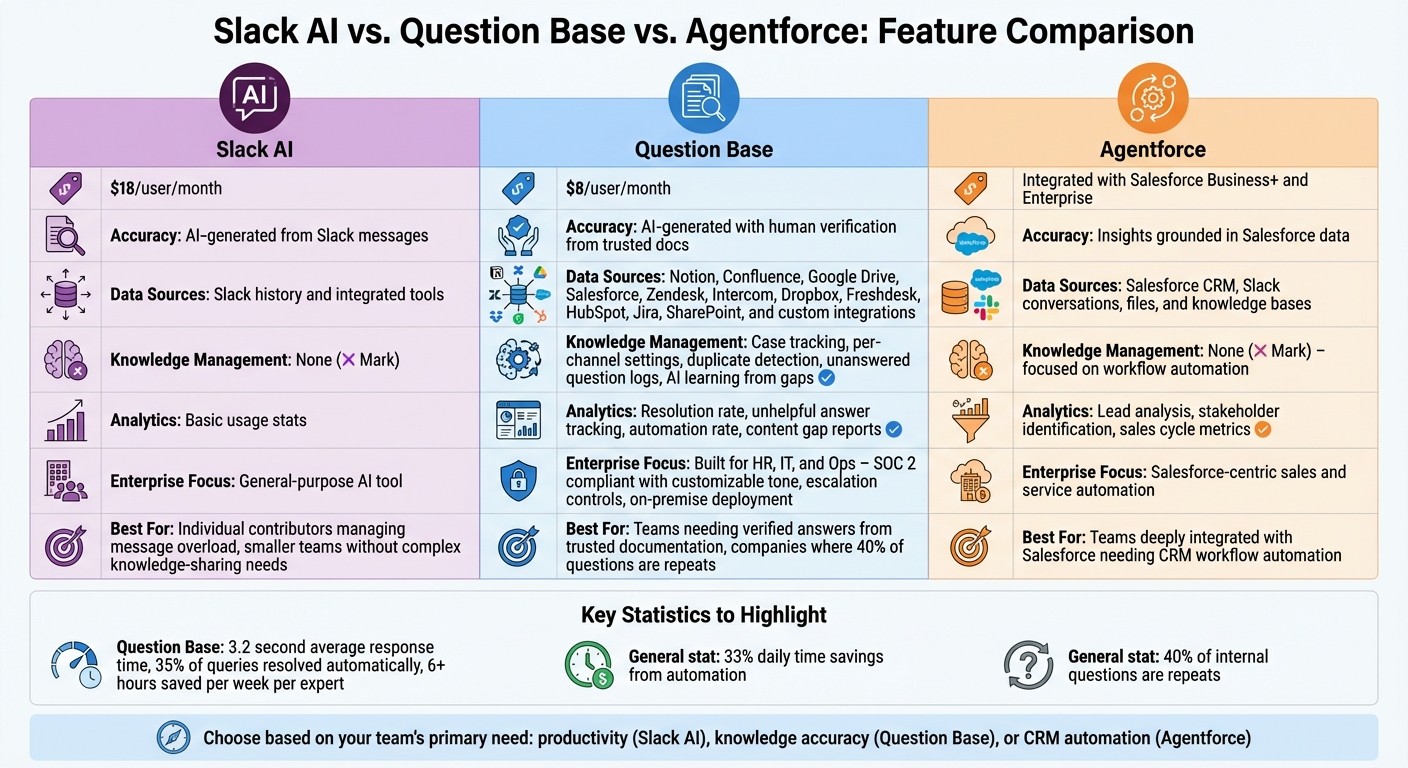
Slack AI vs Question Base vs Agentforce: Feature Comparison Chart
Expanding on how AI agents can supercharge Slack’s functionality, this section breaks down the strengths of three leading solutions to help you find the right fit for your organization. Each tool serves a distinct purpose, so choosing the right one depends on your team’s specific needs.
Slack AI focuses on general productivity, helping users by summarizing threads, highlighting action items, and searching through Slack history.
Question Base is designed to deliver precise, verified knowledge by connecting directly to trusted documentation sources like Notion, Confluence, Google Drive, Salesforce, Zendesk, and more.
Agentforce specializes in automating CRM workflows, working closely with Salesforce to handle tasks such as lead qualification, deal approvals, and opportunity tracking.
While Slack AI is an excellent tool for catching up on conversations, it primarily relies on Slack’s chat history. In contrast, Question Base pulls directly from trusted documentation, making it ideal for teams that need reliable, verified answers. During a recent 30-day pilot, Question Base stood out by responding in an average of 3.2 seconds, resolving 35% of repetitive queries automatically, and saving experts over six hours per week on average. Agentforce, meanwhile, shines when Salesforce-driven workflows are central to your operations, allowing representatives to manage deals, approvals, and customer data seamlessly within Slack.
Side-by-Side Feature Comparison
Feature | Slack AI | Question Base | Agentforce |
|---|---|---|---|
Price | $18/user/month | $8/user/month | Integrated with Salesforce Business+ and Enterprise |
Accuracy | AI-generated from Slack messages | AI-generated with human verification from trusted docs | Insights grounded in Salesforce data |
Data Sources | Slack history and integrated tools | Notion, Confluence, Google Drive, Salesforce, Zendesk, Intercom, Dropbox, Freshdesk, HubSpot, Jira, SharePoint, and custom integrations | Salesforce CRM, Slack conversations, files, and knowledge bases |
Knowledge Management | None | Case tracking, per-channel settings, duplicate detection, unanswered question logs, and AI learning from gaps | None – focused on workflow automation |
Analytics | Basic usage stats | Resolution rate, unhelpful answer tracking, automation rate, and content gap reports | Lead analysis, stakeholder identification, sales cycle metrics |
Enterprise Focus | General-purpose AI tool | Built for HR, IT, and Ops – SOC 2 compliant with customizable tone, escalation controls, and on-premise deployment | Salesforce‐centric sales and service automation |
This table helps clarify which tool aligns best with your team’s goals, making it easier to plan a tailored deployment strategy.
When to Use Each Tool
Each of these tools addresses different challenges, from personal productivity to large-scale workflow automation. Here’s how they stack up:
Slack AI is best for individual contributors who need help managing message overload or catching up after being away. It’s also a great fit for smaller teams without complex knowledge-sharing requirements.
Question Base transforms Slack into a powerful knowledge assistant, ensuring accuracy when verified information is critical. If employees spend 20–30% of their week searching for answers or if up to 40% of internal questions are repeated, Question Base can save significant time and resources. For a company with 1,000 employees, repeated searches could cost over $2 million annually in lost productivity. Connecting trusted documentation directly to Slack ensures employees get accurate answers instantly, without waiting for a colleague.
Agentforce is the go-to solution for teams deeply integrated with Salesforce. It automates tasks like deal approvals, lead routing, and customer case management directly in Slack, eliminating silos. This makes it especially valuable for organizations that are already invested in Salesforce and want to extend its capabilities into their collaboration workflows.
Many large enterprises in the U.S. use all three tools across departments to address different needs. For example, sales teams rely on Agentforce for CRM workflows, HR and IT teams use Question Base for delivering verified answers to policy and procedure questions, and individual contributors turn to Slack AI for everyday productivity tasks. This layered approach ensures every team has the right tool for the job, paving the way for a strategic and efficient rollout across the organization.
How to Roll Out Slack AI Agents in Large Organizations
Launching AI agents across a large enterprise takes careful planning to balance efficiency with security. According to Slack, integrating AI assistants into workflows can help teams save up to 33% of their daily time by automating tasks and improving access to information - provided the rollout is handled properly. Success hinges on starting small, setting clear governance, and using data to guide each step. Below is a phased strategy for deploying AI agents effectively.
Start Small and Expand Gradually
Kick off with 1–3 pilot departments where repetitive questions are most frequent - common examples include HR support, IT helpdesks, or sales operations. Create specific Slack channels like #hr-ai-support or #it-helpdesk, and invite your AI agent using commands such as /invite @questionbase to begin testing. Run a 4–6 week pilot to monitor metrics like resolution time, automation rate, and user satisfaction. Use Slack polls to gather feedback and fine-tune the agent's settings. Scale only after reaching 80% satisfaction in the pilot group to ensure the agent delivers value rather than frustration.
Establish Security, Compliance, and Access Controls
Start by setting up role-based access controls that align with your existing permissions structure. Make sure the AI agent respects Slack channel permissions and uses SSO authentication, so employees only access content they’re authorized to see. For organizations managing sensitive data, choose tools that are SOC 2 Type II certified and offer encryption for data both at rest and in transit. Question Base provides an optional on-premise deployment for maximum control, while Slack’s Enterprise Grid supports multi-workspace management for large-scale setups.
Enable audit logging in your Slack admin panel to track every interaction, query, and data access point. Configure per-channel settings to limit each AI agent’s scope - for example, your HR agent should only operate in HR channels and pull from approved resources like Notion or Confluence, while your IT agent connects to Zendesk and internal runbooks. Assign data stewards to oversee each source, and conduct quarterly security reviews to ensure compliance and data integrity.
Leverage Analytics to Continuously Improve
Once your AI agent is live, use analytics to refine its performance over time. Analytics turn the agent into a smarter, more efficient tool. Focus on three key metrics: automation rate (how many queries are resolved without human intervention), resolution time (aim for under two minutes), and knowledge gaps (unanswered questions that highlight missing documentation).
Question Base provides detailed reports that identify which questions the agent couldn’t answer, helping teams prioritize updates to documentation during quarterly planning. For instance, if 20% of IT queries fail due to outdated runbooks in Notion, you’ll know exactly where to focus your efforts. Monitor user satisfaction through Slack polls, and investigate any answers flagged as unhelpful to improve the agent’s accuracy.
Slack's State of Work research highlights that switching between disconnected apps is a major productivity drain. Use your analytics dashboard to pinpoint which departments benefit most from the AI agent, then expand deployment there next. As one team succeeds, replicate their setup and governance practices across other areas like sales, marketing, finance, and operations. Standardize templates for new channel configurations and data integrations to streamline future rollouts. This ongoing, data-driven approach ensures every phase of the expansion is secure, efficient, and tailored to your organization’s needs.
Conclusion: Picking the Right Slack AI Agent for Your Company
Selecting the right AI agent for Slack hinges on understanding your team’s specific collaboration needs. Slack AI is a great fit for summarizing conversations and improving individual productivity, making it ideal for general teamwork. Agentforce, on the other hand, excels in Salesforce-driven environments, automating CRM tasks and enabling data-driven decisions for sales and service teams. Meanwhile, Question Base stands out for organizations that require accurate, verified knowledge at scale. It connects seamlessly with trusted platforms like Notion, Confluence, Google Drive, and Zendesk to provide instant, reliable answers.
For large enterprises handling sensitive data in areas like HR, IT, and operations, security and customization are critical. Question Base addresses these needs by meeting enterprise-grade security standards and offering customizable deployment options. This gives knowledge managers complete control over content, AI behavior, and escalation workflows. At a price of $8 per user per month, compared to Slack AI's $18, Question Base also delivers advanced analytics on resolution rates, automation rates, and knowledge gaps - valuable insights for quarterly planning and long-term scalability.
The best implementations begin with small-scale rollouts, tracking key performance metrics like automation rates, resolution times, and user satisfaction. By reducing repetitive queries and streamlining access to information, teams can achieve significant time savings. Use these metrics to identify which departments benefit most and replicate successful practices across your organization. Aligning your tool choice with your team’s needs and security priorities ensures you maximize both productivity and knowledge management.
Whether your goal is to minimize context-switching for remote teams, eliminate repetitive questions that drain expert time, or build a scalable knowledge framework, it’s crucial to choose a tool that matches your organization’s scale, security requirements, and integration needs. By taking this thoughtful, metrics-driven approach - from tool selection to rollout - you can transform Slack into a powerful internal knowledge assistant. For teams prioritizing accuracy, auditability, and ownership of information, Question Base turns Slack into more than just a chat tool - it becomes a dynamic, enterprise-grade support system with minimal deployment effort.
FAQs
How can Slack AI agents boost productivity for cross-functional teams?
Slack AI agents streamline workflows for cross-functional teams by handling repetitive questions, cutting down the time spent hunting for information, and organizing internal knowledge. While Slack AI excels at summarizing conversations, Question Base goes further by providing expert-verified answers pulled directly from trusted platforms like Notion, Confluence, and Salesforce. This approach ensures responses are both accurate and consistent across the board.
Built with enterprise teams in mind - think HR, IT, and operations - Question Base transforms Slack into a dynamic knowledge hub. It minimizes repeated questions, accelerates onboarding processes, and turns fleeting chat exchanges into structured, searchable documentation. For teams seeking dependable and scalable internal support, Question Base offers a straightforward way to save time and enhance productivity.
How does Question Base compare to Slack AI and Agentforce?
Slack AI is excellent for summarizing conversations and boosting general productivity. However, Question Base goes a step further by catering specifically to enterprise support teams that require accurate, verified knowledge at scale. While Slack AI primarily generates responses based on chat history, Question Base connects directly to reliable sources like Notion, Confluence, and Salesforce. This ensures teams receive expert-verified answers, complete with the necessary context.
Agentforce, on the other hand, focuses on automating workflows and managing internal processes through customizable AI agents. While it offers flexibility, it may lack the depth of integrations and knowledge management features that Question Base provides. Question Base shines when it comes to transforming Slack conversations into structured, searchable knowledge. For teams that prioritize accuracy, compliance, and control over their information, Question Base offers enterprise-grade security, robust customization, and an easy-to-implement setup.
How can companies protect their data when using Slack AI agents?
To protect sensitive data when integrating Slack AI agents, businesses must focus on solutions that provide enterprise-level security features. Key elements to consider include SOC 2 Type II compliance, encryption both at rest and in transit, and options for on-premise deployment to maintain tighter control.
Take Question Base as an example. It empowers organizations to fully manage what content is accessible and how the AI operates, ensuring critical information stays protected while enabling smooth collaboration within Slack.