∙
Cooper
∙
Reading time:
18 min

In enterprise environments, managing approvals through Slack can eliminate the chaos of scattered requests, missed messages, and unclear accountability. By automating workflows, teams can streamline processes like expense approvals, software access, and IT changes - all while maintaining clear audit trails and compliance.
Key Takeaways:
Use Slack Workflow Builder to create approval processes with structured forms, Approve/Deny buttons, and real-time notifications.
Integrate external tools like Salesforce or Google Drive for advanced functionality and data tracking.
Maintain audit trails with detailed logs of requests, approvers, timestamps, and outcomes.
Set up routing rules based on roles, not individual names, to future-proof workflows against team changes.
Regularly review metrics like cycle time, completion rates, and escalation trends to identify and resolve bottlenecks.
For enterprises, Slack approval workflows not only improve efficiency but also ensure accountability and compliance. Start with simple workflows, test thoroughly, and scale as needed to meet your team’s needs.
How to Set Up Slack Workflow Builder for Approvals
Slack Workflow Builder Basics
Slack's Workflow Builder is included with all paid plans - Pro, Business+, and Enterprise Grid - and operates using triggers to initiate workflows and steps to carry out actions [3][6]. A trigger determines how the workflow begins, while steps define its actions. For approval workflows, you’ll generally rely on a shortcut trigger (found in Slack’s lightning bolt menu) or a link trigger that can be pinned in relevant channels, like #finance-approvals or #it-requests [2].
The steps in Workflow Builder are grouped into three main types: sending messages, opening forms, and connector steps that link with tools like Salesforce or Google Drive [3]. The approval process itself relies on a "Send a form response" step, where you enable the "Include buttons to approve or deny" option. This creates the familiar Approve/Deny interface, eliminating the need for emoji reactions or manual follow-ups in direct messages [2].
Admins can control who can publish workflows by setting permissions, ensuring that only authorized users can create automations tied to sensitive approval processes [6].
Creating Your First Approval Workflow
To start, open Slack’s desktop app, click on your workspace name, and navigate to Tools > Workflow Builder [2]. Select New Workflow, choose From scratch, and give your workflow a descriptive name [2].
Next, decide on the trigger type. A shortcut works well for general approvals, while a link is better for department-specific requests you want to pin in a channel [2]. Add an Open a form step to collect request details. Include fields like "Expense Amount" (short answer), "Purpose" (paragraph), and "Receipt" (file upload). For critical fields, enable "Make response required" to ensure approvers receive all necessary information [2].
Follow this by configuring a Send a form response step. Direct this step to an approver or a channel, such as #finance-approvals, and enable the "Include buttons to approve or deny" option [2]. Then, set up paths for the outcomes: under If approved and If denied, add notification steps to inform the requester of the decision. Use variables like {Submitter} and {Form field} to personalize these messages [2].
Before making the workflow available to everyone, test it privately to ensure it functions as expected. Permissions can vary between creators and users, so this step is essential [2]. Once you’re satisfied, click Publish to activate it across your workspace.
With this basic approval workflow in place, you can further enhance and customize your Slack workflows by integrating external tools.
Connecting External Tools to Slack Workflows
To expand your workflow’s capabilities, integrate external tools. Connector steps allow you to update Salesforce records, log data in Google Sheets, or trigger actions in other systems [3][9]. These integrations usually require users to authenticate their accounts, but admins can simplify this by enabling domain-wide authentication for tools like Google Calendar, which automatically connects all team accounts [10].
For example, SoFi implemented domain-wide authentication and reported a 790% increase in weekly Google Calendar usage after automating the setup process for employees [10]. Their team shared:
"While educating teams on how to use a new feature can take weeks, we were able to onboard thousands of employees to the Google Calendar app in a matter of minutes" [10].
Some integrations, such as Salesforce, may require extra setup, like installing a package from the Salesforce AppExchange [10]. If a connector step prompts you with "additional configuration" alerts, use the "Request help from an admin" button to initiate the required backend setup [9]. Before approving any external tool, review the "Security & Compliance" section in the Slack App Directory to check for SOC 2, HIPAA, and data retention certifications. This ensures your workflows meet enterprise security standards [10].
If your workspace enforces app approval, team members will need to submit requests to admins through Workflow Builder before adding connector steps [9]. Admins can assign app managers to review and approve these requests, streamlining the process and reducing delays for IT teams [10]. On Enterprise Grid, you can even export workflow form responses as CSV files for external analysis or compliance audits [7].
Best Practices for Enterprise Approval Workflows
Set Clear Triggers and Routing Rules
Approval workflows thrive on clarity and structure. Start by using Workflow Builder's shortcut or link triggers along with standardized forms to gather all necessary details upfront [8].
For routing, frameworks like RACI (Responsible, Accountable, Consulted, Informed) work well when paired with role-based access instead of individual names. This approach ensures continuity even when team members change roles [4]. Consistency across departments is key - standardized templates for HR, IT, and Finance channels make it easier for employees to navigate familiar approval structures, minimizing errors and confusion [4]. To make these workflows even more accessible, store documentation and routing diagrams in Slack Canvas within the relevant channels. This way, team members can reference procedures without leaving Slack [4].
By establishing these structured pathways, you lay the groundwork for timely, automated notifications.
Use Real-Time Notifications and Reminders
Once routing is in place, real-time notifications help prevent delays and keep everyone on the same page. Automated alerts and threaded messages ensure both requesters and approvers stay informed without overloading the main channel [8]. Workflows with one-click "Approve" or "Deny" buttons streamline the process, reducing the need for manual follow-ups [8].
Slackbot can be configured to send direct messages to requesters as soon as a decision is made, ensuring they’re updated without additional effort from approvers [8][9]. For requests requiring admin approval, consider centralizing notifications in a dedicated #app-managers channel. This allows multiple admins to respond to pending items, avoiding bottlenecks caused by relying on a single person [5].
A 2023 Slack survey highlights the benefits of transparency: leaders who openly communicate changes see their teams become 1.8 times more productive and 2.3 times more focused [4]. Real-time updates not only keep workflows moving but also foster alignment and efficiency.
Track and Log Approvals for Audits
In enterprise settings, having a clear, traceable record of decisions is non-negotiable. Use explicit Approve/Deny buttons that generate unique request IDs to create detailed audit trails [8][1].
Tara Wickramasinghe from Ravenna outlines the essentials:
"An effective Slack approvals audit trail includes the original request fields, names of each approver, timestamps for every decision, and any attachments that support the decision." [1]
To avoid cluttering Slack channels, maintain a searchable record outside of them - whether in a database, spreadsheet, or data warehouse [8]. For large-scale auditing across Enterprise Grid, the admin.apps.activities.list API method can help by programmatically retrieving logs for the entire organization [11].
Regular reviews are crucial. Schedule quarterly checks of your workflow documentation to identify bottlenecks and ensure routing logic stays aligned with team structures [4]. Additionally, documenting rejection reasons and comments provides a complete view of decision-making. This not only refines internal guidelines but also demonstrates accountability and thorough governance during audits [1].
How to Set Up Custom Approval Workflows in Salesforce and Slack Using Centro
Enterprise Use Cases for Slack Approvals
These real-world scenarios show how Slack approval workflows can be customized to meet various enterprise needs.
Procurement and Vendor Approvals
Procurement teams often rely on Slack forms to gather essential vendor details like expense amounts, cost centers, quotes, and receipts. These requests are then routed using conditional logic based on spend thresholds [14][2]. For instance, low-cost purchases might require only a manager's approval, while high-value contracts automatically involve Finance, Legal, or Security teams [13][1].
In April 2025, Slack's internal sales operations team introduced an "Approvals Bot for Deals." This bot automatically creates private channels for contracts with non-standard terms, pulling in the appropriate approvers based on Salesforce data. As a result, approval times dropped by 70%, and 80% of deals were approved directly in Slack instead of the CRM [16].
"We wanted to bring all that relevant information into Slack, where our approvers are already working, and have Slack be the platform that they can access all that information and facilitate their actual approval."
Kiona Davies, Senior Manager of Sales Operations, Slack [16]
Slack workflows also integrate seamlessly with external tools like NetSuite, Coupa, and QuickBooks. These workflows not only record approvals but also trigger fulfillment processes automatically [12][15]. Beyond vendor contracts, similar automation enhances efficiency in employee lifecycle management and IT change processes.
Employee Offboarding and Access Removal
HR teams can initiate offboarding workflows directly in Slack or through integrations with platforms like Workday and BambooHR. These workflows guide requests through a structured process: starting with a manager, moving to an app owner, and finally to a security reviewer for sensitive systems. This ensures smooth knowledge transfer, asset collection, and timely license revocation [17][18].
With integrations to identity providers like Okta and Azure AD, Slack automates offboarding tasks, significantly reducing the risks tied to lingering access. Alarmingly, 63% of businesses report that former employees still have access to company data, and over 30% take more than three days to revoke all access [17][18]. Automated workflows can cut identity management costs by 60% while reducing access errors by 99% [19].
Slack also enables immediate credential revocation across hundreds of applications, such as Salesforce, GitHub, and AWS, as soon as approvals are granted. Every step, from comments to timestamps, is logged to ensure compliance with regulations like SOX, HIPAA, and GDPR [17][19].
IT Change Management Approvals
IT teams use Slack forms to streamline change management. These forms capture essential details like the scope, reason, and expected duration of change requests, eliminating the need for repetitive back-and-forth clarifications [8]. Requests are routed through multi-level approval chains, which might include a manager, application owner, and security reviewer, with dynamic routing based on directory data [8]. This ensures that every request adheres to a consistent, time-sensitive approval cycle. For example, internal SLAs might require manager sign-off within one business day and specialized departments like Security or Finance to respond within two business days [1].
Automated escalations help prevent delays by notifying backup approvers or team channels if someone is unresponsive [8]. Once approved, workflows automatically update ITSM tickets or alert deployment teams, completing the process without manual effort [8]. These structured steps ensure accountability while reducing inefficiencies caused by manual handoffs.
Security and Compliance in Slack Approvals
Approval workflows often deal with highly sensitive information - think vendor contracts, employee access updates, or infrastructure changes. That makes security and compliance absolutely critical for enterprises. While Slack includes built-in tools to help meet standards like SOC 2, HIPAA, and GDPR, proper configuration by admins is essential.
A strong security foundation starts with securely managed permissions. Following the principle of least privilege is key: every app and workflow should only request the permissions it truly needs. To manage this effectively, categorize app scopes into three levels: "Always allowed" for low-risk scopes, "Requires approval" for medium-risk scopes, and "Restricted" for high-risk ones [20]. Enabling the "Require App Approval" setting in your App Management Settings ensures no unvetted tools are installed [20][5]. For an extra layer of network security, limit OAuth tokens to specific IP address ranges. Slack supports up to 10 entries in an allowed IP list, blocking API calls from unauthorized locations [20].
Audit trails are another cornerstone of compliance. Use the admin.apps.activities.list API to generate detailed logs, tracking who approved what and when [11]. For custom approval apps, make sure your code logs user actions and errors - this is invaluable for investigating security incidents [20]. Additionally, download workflow form responses to local systems to create permanent records for external audits [3].
"Security shouldn't be an afterthought. A secure Slack ecosystem requires a proactive approach that integrates security principles directly into your development and management workflows." - Slack Developer Documentation [20]
To strengthen security further, avoid hardcoding tokens or secrets in workflows. Instead, rely on tools like AWS Secrets Manager or HashiCorp Vault to inject credentials at runtime. Always transmit secrets securely using POST requests over TLS-encrypted connections [20]. For workflows involving AI or large language models (LLMs), disable link unfurling and validate message sources to reduce the risk of data leaks [20]. Regular token rotation also minimizes exposure if a token is compromised [20].
Before integrating third-party tools, thoroughly review the "Security & Compliance" tab in the Slack App Directory. This helps confirm compliance with standards like SOC 2, HIPAA, or GDPR, as well as data retention practices [10]. Assigning specific individuals or user groups as "App Managers" can distribute the workload while maintaining accountability [20][5]. Collaborate with your security team to document clear app approval criteria - this playbook not only simplifies audits but also ensures long-term compliance across your Slack environment [10].
Measuring and Improving Approval Workflows
Slack Workflow Builder vs Third-Party Approval Tools Comparison
Key Metrics to Track
Effective approval workflows don’t just complete tasks - they generate data that can help refine your processes over time. Start by measuring cycle time to pinpoint delays in your approval chain. Keep an eye on completion rates to understand how many workflows make it to a final decision versus those that are abandoned or time out. If abandonment is high, it might signal that your request forms are too complicated or unclear.
On-time resolution is essential for meeting Service Level Agreements (SLAs), while escalation rates can show how often requests get rerouted to backup approvers or fallback rules due to inactivity [1]. For workflows with multiple approval levels, track stage-specific latency to identify bottlenecks in specific departments, such as Finance, Legal, or IT [1].
Monitoring error rates is also crucial. Technical failures - like workflows that fail to trigger or run into integration issues - can erode confidence in the system [3]. Lastly, track volume trends across departments or cost centers. This data can highlight staffing needs or inefficiencies in your processes [1].
By focusing on these metrics, you’ll have the insights needed to tackle bottlenecks and improve your workflows.
Using Analytics to Find and Fix Bottlenecks
Metrics are only useful if you act on them. Once you’ve identified where delays occur, use targeted strategies to automate tasks in Slack and address them. For example, if a specific stage is consistently slow, set automated reminders. Use Slack notifications or daily digests to nudge approvers before they miss SLA deadlines [1]. If workload or absenteeism causes frequent delays, consider setting up automatic fallback routing to redirect requests to a team channel or backup group [1].
To dig deeper into patterns, export workflow data as CSV files and analyze them in Business Intelligence (BI) tools. This approach can reveal trends, such as delays in procurement requests from certain regions. Additionally, monitor team channels for recurring "how-do-we-do-this" questions about specific workflows. These questions often indicate a need for clearer documentation or simpler processes [4].
"The strongest approval workflows do more than complete tasks. They generate data that helps you improve operations over time." - Ravenna Software [1]
A 2023 Slack survey found that open communication from leaders increases desk workers’ productivity by 1.8 times and focus by 2.3 times [4]. Use your analytics findings to refine workflows and communicate changes transparently to maintain trust and encourage adoption.
This data-driven approach helps you choose the right tools - whether it’s Slack Workflow Builder or a third-party solution - to meet your organization’s needs.
Native Slack Workflows vs. Third-Party Tools
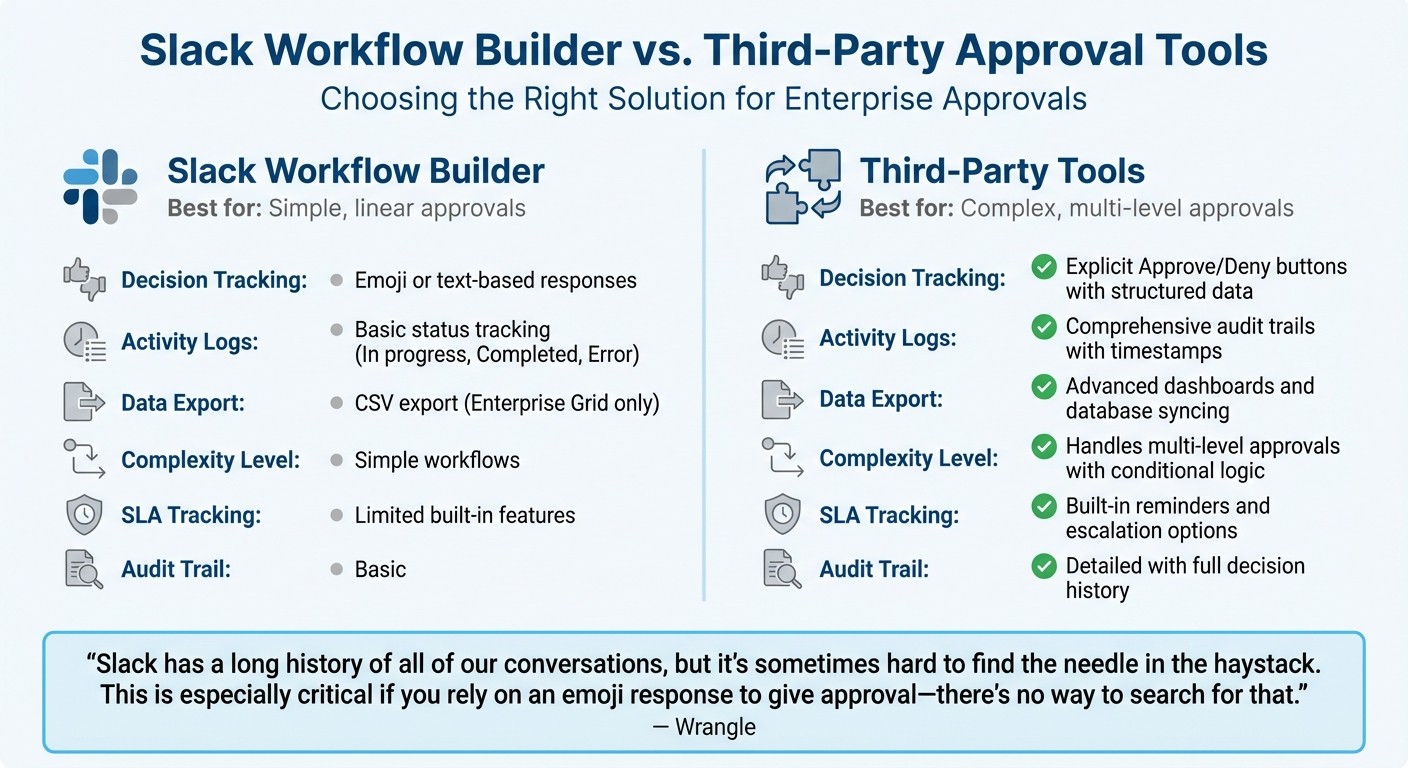
Comparing Slack Workflow Builder vs. AI agents shows that the native tool is a solid option for straightforward, linear approvals. It allows managers to track workflow activity, including statuses like "in progress", "completed", or "error" [3]. Enterprise users can also export form responses as CSV files for external analysis [7]. However, native workflows often rely on emoji reactions or text responses for decisions, which can make it harder to search, aggregate, or audit responses [8].
Third-party tools like Wrangle or Ravenna offer enhanced features, such as explicit "Approve" and "Deny" buttons that generate structured data. This makes it easier to create audit trails and accurately track resolution rates [8]. These tools also support multi-level approvals with conditional logic, allowing requests to route through multiple stages - like Manager, Legal, and IT - based on factors like cost or risk [8].
Feature | Slack Workflow Builder | Third-Party Tools |
|---|---|---|
Decision Tracking | Emoji or text-based responses [8] | Approve/Deny buttons for clear data [8] |
Activity Logs | Basic status tracking (e.g., In progress, Completed) [3] | Comprehensive audit trails [8] |
Data Export | CSV export (Enterprise only) [7] | Advanced dashboards and database syncing [8] |
Complexity | Best for simple workflows [3] | Handles multi-level approvals with logic [8] |
SLA Tracking | Limited built-in features [1] | Includes reminders and escalation options [1] |
"Slack has a long history of all of our conversations, but it's sometimes hard to find the needle in the haystack. This is especially critical if you rely on an emoji response to give approval - there's no way to search for that." - Wrangle [8]
For processes requiring strict audit trails - like purchase approvals or contract sign-offs - consider tools that provide explicit decision tracking. These insights help you make informed decisions about which tools best suit your needs, ensuring streamlined and accountable workflows.
If your team manages approvals alongside internal knowledge sharing, Question Base offers analytics on resolution rates, unhelpful answers, and automation performance. By connecting directly to trusted sources like Notion, Confluence, and Salesforce, it ensures approvers have accurate information at their fingertips - without ever leaving Slack.
Conclusion
Slack approval workflows can reshape how enterprises manage procurement, IT change requests, and employee access - but only if they’re designed with clarity, accountability, and growth in mind. Swap informal direct messages for structured forms that capture all the necessary details. Implement dynamic routing based on roles or cost centers, avoiding hard-coded names to ensure workflows remain functional during team changes. Establish clear service level agreements (SLAs) - for example, 24 to 48 hours for decisions - and use automated reminders or escalations to keep requests moving forward[1].
Begin with a single, high-frequency process, like IT access or expense reimbursements, before tackling more complex workflows. Plan periodic audits - quarterly or biannually - to assess performance and update documentation. Research shows that when leaders communicate updates openly, employees are 1.8 times more productive and 2.3 times more focused[4]. Keeping your team informed fosters trust and ensures smoother transitions as workflows evolve.
A structured approach is the backbone of effective enterprise workflows. Beyond automating approvals, using knowledge management integrations for Slack to connect verified information to your processes can further enhance efficiency. For organizations that require reliable information alongside approvals, Question Base seamlessly connects to trusted platforms like Notion, Confluence, and Salesforce. It offers analytics on resolution rates and automation performance, equipping approvers with verified insights directly in Slack. Whether you use Slack’s Workflow Builder or external tools, the goal remains the same: create a scalable system with a clear audit trail for every decision.
FAQs
When should we use Workflow Builder vs a third-party approvals tool?
Slack Workflow Builder works well for automating straightforward, repetitive tasks within Slack, such as onboarding new team members or handling basic approval processes. However, when workflows demand more complexity - like detailed tracking, tailored configurations, or connections to external systems - third-party tools are a better fit. These tools provide advanced capabilities such as dynamic routing, audit trails, and compliance features, making them especially suited for enterprise-level needs like expense approvals or managing confidential HR processes.
How do we build audit-ready logs for Slack approvals?
To create logs that meet audit requirements for Slack approvals, start by utilizing Slack’s enterprise approval features to monitor key activities such as requests, approvals, and restrictions. Use Slack’s APIs to pull detailed activity logs, including timestamps, user identities, and decisions made. For added security and compliance, integrate external logging tools to store this data securely. Make it a routine to review and export these logs, ensuring they support transparency, accountability, and compliance with both organizational policies and regulatory requirements.
How can we route approvals by role when teams change?
Approvals in Slack can be efficiently managed by routing them based on roles using dynamic workflows and automation. With Slack's Workflow Builder, you can use conditional logic to ensure approvals are directed to the right people, based on their roles or specific attributes. For more advanced routing capabilities, tools like Wrangle provide features that automatically adjust to role changes. By integrating Slack with HR or directory systems, workflows stay current as your team structure evolves, ensuring accurate and adaptable approval processes for enterprise operations.