∙
Cooper
∙
Reading time:
13 min

Salesforce has reimagined Slackbot as a smarter AI assistant designed to simplify work and save time. This upgraded version, available for Business+ and Enterprise+ customers starting January 2026, uses context from Slack conversations, Salesforce CRM, and other tools to handle tasks like drafting documents, summarizing meetings, and automating workflows.
Key highlights:
Context-Aware Responses: Slackbot pulls data from chats, files, and calendars to provide precise answers.
Task Automation: Handles repetitive tasks like drafting emails or creating meeting templates, saving hours daily.
Seamless Integrations: Works with Salesforce tools and third-party apps like Google Drive and OneDrive.
Proven Results: Salesforce’s IT bot resolves 35% of issues instantly, saving 16,800 hours annually—a clear example of how Slack automation saves time for support teams.
For teams needing verified, audit-ready answers, tools like Question Base may be a better fit. While Slackbot boosts productivity with AI-driven insights, Question Base focuses on delivering accurate, expert-approved knowledge for enterprise support.
Choosing the right tool depends on your priorities: productivity with Slackbot or precision with Question Base.
Slack School | Meet Slackbot, your AI Agent for Work

What Salesforce's Context-Aware Slackbot Can Do
The revamped Slackbot functions as a personal AI assistant, seamlessly pulling context from Slack conversations, Salesforce CRM data, calendar entries, and files stored on platforms like Google Drive and OneDrive. This allows it to deliver tailored responses and streamline complex workflows effortlessly [3][6].
Context-Aware Answers
By combining data from multiple sources, Slackbot provides precise answers without requiring users to jump between different tools. Its responses are based on your organization's actual data, ensuring they align with your permissions and workflows [9][10].
"Because so much of our work happens in Slack, Slackbot already understands our world. I don't have to write a long brief to get it up to speed... it just gets the context from day one." - Megan Harrigan, Director of Global CX Projects & Readiness, Xero [1]
For example, at Beast Industries, Creative Supervisor Spencer relies on Slackbot to catch up on 30–40 missed messages after stepping away for just 10 minutes. The bot highlights key decisions and action items, acting as a virtual assistant that ensures no tasks slip through the cracks [9].
Task Automation
Slackbot also handles repetitive tasks by drafting emails, creating meeting templates, and summarizing discussions in your team's tone. This reduces the need for constant context-switching, saving valuable time each day. Mollie Bodensteiner, SVP of Operations at Engine, shared that Slackbot generates a meeting template in just 17 seconds, cutting down her daily context-switching time by about 30 minutes [3][11]. The summary feature alone saves 15 to 20 minutes per use, helping teams avoid missed action items [1].
With the AI Workflow Builder, users can set up automations using simple, natural-language prompts. These automations include recurring reminders and automated channel summaries. Slack's AI capabilities have already helped customers summarize over 600 million messages, saving an impressive 1.1 million hours of work [5].
Beyond simplifying individual tasks, Slackbot integrates seamlessly with enterprise systems to coordinate larger-scale workflows.
Integration with Salesforce Ecosystem
Slackbot serves as a central hub, coordinating tasks across Salesforce’s Agentforce agents and third-party tools like Adobe, Anthropic, and Perplexity through natural conversation [3]. It connects with Salesforce's Agentforce 360 platform to provide insights and ensure real-time updates across your organization [6][12].
At Accenture's Salesforce Business Group, sales teams use Agentforce within Slack to automate tasks like creating contact and close plans. Under Stephanie Sadowski's leadership, the team uses enterprise search to surface insights and maintain dynamic updates, improving their ability to deliver client solutions quickly [12].
What’s more, Slackbot requires no manual setup or training. It leverages natural language processing to understand user intent from the start, all while respecting existing permissions. Importantly, customer data is not used to train large language models, ensuring privacy and security [1][3].
How Enterprises Use Context-Aware Slackbot for Knowledge Management
Enterprises often face the challenge of delivering quick answers while critical knowledge remains scattered across various systems. A context-aware Slackbot solves this by consolidating information from platforms like Slack, Google Drive, OneDrive, and Salesforce into a single, conversational interface. This bot not only understands a user’s role and permissions but also enhances how teams manage and access knowledge, streamlining workflows across the organization [7][1].
Faster Internal Support
Internal support teams - particularly in HR, IT, and operations - spend significant time addressing repetitive queries. Salesforce’s IT team serves as a prime example. In late 2025, Neil Cummins, Director of Techforce Support, spearheaded the deployment of an Agentforce bot within Slack to assist over 28,000 employees. The team began by auditing their knowledge base, narrowing 2,000 articles down to 600 optimized for AI integration. The results were transformative: the bot now resolves 35% of IT issues instantly, saving the company 16,800 hours annually and managing over 64,000 conversations [4].
"The real power of the agent is that it gives people the exact piece of information they need without the back-and-forth." - Neil Cummins, Director of Techforce Support, Salesforce [4]
Building on this success, Salesforce introduced the BaseCamp Agent in early 2026 to improve support for HR, Legal, and Sales teams across 17,000 employees. By integrating content from seven business units, the agent achieved a 96%+ self-service rate and reduced manual case volumes by 5% year-over-year [2]. When the bot can’t resolve a query, it collects all relevant details and routes the request to the appropriate team, ensuring smooth handoffs without unnecessary delays [2][4].
The benefits of Slackbot extend beyond support, helping teams make faster, more informed decisions.
Faster Decision-Making
The context-aware Slackbot also enhances decision-making by organizing scattered information in real time. Instead of sifting through endless Slack threads, meeting notes, or file attachments, teams can ask the bot to retrieve urgent messages, outstanding tasks, or account briefings before critical meetings or customer calls [7][8].
Users report saving at least 90 minutes per day by letting the bot prepare meeting summaries or extract key points from lengthy PDFs or spreadsheets in seconds [3][8]. This shift from simply finding information to actively supporting planning and execution marks a major transformation in how enterprise teams operate [8].
Industry Applications
These productivity gains span multiple industries:
Healthcare organizations quickly access updated policies and compliance protocols.
Financial services firms retrieve regulatory guidelines, audit procedures, and risk management resources vital for compliance.
Insurance companies streamline access to policy details and claims processes, cutting down search times.
Technology and engineering teams stay on top of evolving product documentation, API references, and troubleshooting guides.
Education institutions provide faculty with easy access to academic policies, research protocols, and student service information.
While Slackbot improves internal workflows, tools like Question Base go a step further by offering verified, audit-ready knowledge solutions. For teams managing high question volumes, Question Base ensures accuracy and reliability. It directly integrates with trusted sources like Notion, Confluence, and Salesforce, offering features such as case tracking, duplicate detection, per-channel settings, and analytics to identify knowledge gaps. Unlike Slack AI, which excels at summarizing conversations and improving general productivity, Question Base focuses on delivering precise, verified knowledge at scale - ideal for internal support teams where accuracy and ownership are critical.
Salesforce Slackbot vs. Question Base: A Comparison
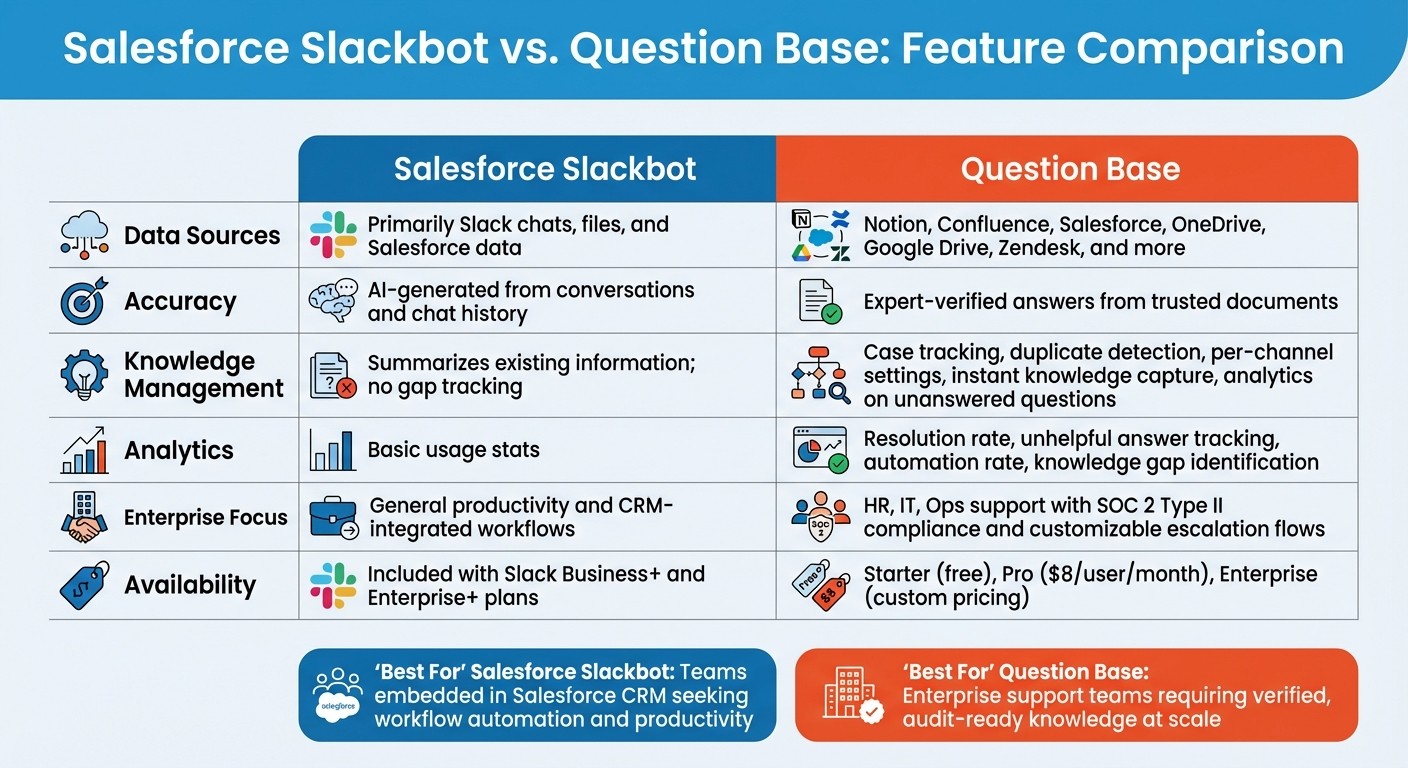
Salesforce Slackbot vs Question Base Feature Comparison
Salesforce's Slackbot focuses on improving general productivity by summarizing conversations, drafting content, and automating workflows. In contrast, Question Base is tailored for internal support teams that need verified, audit-ready answers sourced from trusted documentation. While Slackbot leans on internal conversation data, Question Base pulls from expert-approved materials.
Taking a deeper dive into their functionality reveals critical differences between Salesforce's Slackbot and Question Base.
Feature Comparison
Feature | Salesforce Slackbot | Question Base |
|---|---|---|
Data Sources | Primarily Slack chats, files, and Salesforce data | Notion, Confluence, Salesforce, OneDrive, Google Drive, Zendesk, and more |
Accuracy | AI-generated from conversations and chat history | Expert-verified answers from trusted documents |
Knowledge Management | Summarizes existing information; no gap tracking | Case tracking, duplicate detection, per-channel settings, instant knowledge capture, analytics on unanswered questions |
Analytics | Basic usage stats | Resolution rate, unhelpful answer tracking, automation rate, knowledge gap identification |
Enterprise Focus | General productivity and CRM-integrated workflows | HR, IT, Ops support with SOC 2 Type II compliance and customizable escalation flows |
Availability | Starter (free), Pro ($8/user/month), Enterprise (custom pricing) |
This side-by-side comparison underscores their distinct capabilities. Let’s explore when these differences become critical for your support team.
When Question Base Is the Better Choice
Question Base stands out when precision and auditability are critical to your support operations. It’s designed to deliver verified answers, ensuring reliability for teams that can’t afford inaccuracies. Question Base also tracks unanswered questions, flags knowledge gaps, and allows experts to capture Slack thread insights instantly, transforming them into permanent knowledge base entries.
For industries with strict compliance requirements, such as healthcare or finance, Question Base provides enterprise-grade security, including SOC 2 Type II compliance, encryption at rest and in transit, and optional on-premise deployment. While Slackbot is a strong choice for teams already embedded in Salesforce CRM looking for workflow automation, Question Base excels for enterprise support teams that need verified, scalable knowledge - not just AI summaries of past conversations.
How to Implement Salesforce Slackbot
Salesforce has laid out a step-by-step approach for deploying its Slackbot, focusing on secure and efficient implementation while adhering to strict permission protocols. This ensures the bot delivers its AI-driven benefits within a controlled and compliant environment.
Deployment Timeline
The context-aware Salesforce Slackbot is being introduced to Business+ and Enterprise+ customers on a phased schedule from January to February 2026 [3][6]. Pilot testing began in September 2025 with early adopters, paving the way for general availability in January 2026 [6]. Alongside the core Slackbot features, Salesforce has also rolled out new enterprise search connectors for Gmail, Outlook, and Notion during this period.
Internal tests at Salesforce have shown promising results, with AI agents achieving high resolution rates and significant time savings in IT and HR support tasks.
Admin Controls and Customization
Administrators can manage Slackbot settings directly through the Slack Marketplace and workspace configurations. This includes controlling which third-party agent apps are integrated into workspaces and disabling specific Slack AI features to meet organizational requirements. Importantly, the bot adheres to existing enterprise permissions, ensuring users only access data they are authorized to view.
Admins can link Slackbot to enterprise data sources like Salesforce, Google Drive, and OneDrive via built-in connectors. For more tailored needs, teams can leverage the RTS API and MCP server to securely integrate internal repositories. Additionally, the AI Workflow Builder allows admins to automate routine tasks by simply using natural language prompts.
Planned Features
Salesforce has outlined several enhancements to expand Slackbot's functionality, including:
Enabling users to take direct actions and build custom agents through no-code natural language tools.
Facilitating seamless coordination between specialized Agentforce and third-party agents via conversational interfaces.
Introducing more advanced enterprise search connectors with enhanced browsing capabilities.
Strengthening integration with Einstein Search Answers for improved query handling.
Automating ticket management for internal support teams [2][3][4][14].
"As Slackbot continues to grow and evolve, it will even be able to take action on your behalf and build agents based on your request, all with no code required." - Slack [14]
All these features operate within Slack's virtual private cloud, ensuring customer data remains private and is not used to train large language models [1].
Conclusion
Salesforce's upgraded Slackbot is reshaping how enterprises manage knowledge by integrating real-time conversational data, files, and calendars. It goes beyond basic search functions, offering personalized insights that align with the natural flow of work. The results speak for themselves: tools like the Techforce Agent and BaseCamp Agent have demonstrated high resolution rates and significant time savings[2][4].
When evaluating AI-powered knowledge tools, context and accuracy are key considerations. For teams that rely on expert-verified answers drawn from trusted documents - not just AI-generated interpretations of past conversations - a more tailored solution may be necessary.
Question Base was built with high-volume support teams in mind. Unlike Slack AI, which learns from internal chats, Question Base connects directly to trusted sources like Notion, Confluence, and Salesforce. It provides expert-verified answers, tracks unresolved questions to highlight knowledge gaps, and delivers detailed analytics on resolution rates and automation performance. These features are especially valuable for HR, IT, and operations teams managing large-scale internal support needs. This distinction makes tools like Question Base indispensable for teams requiring precision and audit-ready knowledge.
The choice comes down to your team’s priorities: Slack AI offers broad productivity support, while Question Base excels in delivering accurate, audit-ready knowledge at scale. If your organization values accuracy, auditability, and ownership of knowledge, Question Base provides the enterprise-grade controls and specialized capabilities that general-purpose AI tools lack.
"To truly be useful at work, AI needs context: an understanding of your conversations, your tools and how decisions actually get made." - Denise Dresser, CEO, Slack[3]
Both solutions play unique roles in a well-rounded knowledge management strategy. Whether you opt for Salesforce's Slackbot, Question Base, or a mix of both, it’s essential to choose tools that align with your team’s knowledge management goals and operational needs.
FAQs
How does Salesforce's new context-aware Slackbot boost workplace productivity?
Salesforce's context-aware Slackbot transforms workplace productivity by providing immediate and accurate answers while streamlining workflows - all without leaving Slack. Unlike standard chat assistants, this bot pulls context from conversations and integrates seamlessly with enterprise tools such as Salesforce, Notion, and Confluence, delivering tailored insights when and where they’re needed.
Designed to adapt to specific roles and team dynamics, the Slackbot supports HR, IT, and operations teams by cutting down on repetitive questions. This allows teams to dedicate more time to strategic tasks. By reducing manual effort and improving decision-making processes, it helps boost efficiency and keeps everyone on the same page.
How does Salesforce's Slackbot compare to Question Base?
Salesforce's Slackbot has transformed into a smarter, context-aware AI assistant designed to boost productivity within Slack. By analyzing user context, automating workflows, and pulling insights from chat history, it’s tailored for improving personal efficiency and handling role-specific tasks within Slack’s environment.
Question Base, however, takes a different approach, catering specifically to enterprise teams like HR, IT, and operations. It integrates directly with trusted knowledge hubs such as Notion, Confluence, Salesforce, and OneDrive to deliver precise, expert-approved answers - not just AI-driven responses based on chat history. This makes it a go-to solution for organizations that need trustworthy, audit-ready information along with advanced capabilities like case tracking, duplicate detection, and analytics.
To put it simply, Slackbot is all about enhancing productivity within Slack, while Question Base stands out as a robust tool for enterprise-level knowledge management and dependable support.
How can businesses protect their data when using Slackbot's new AI features?
Businesses can safeguard their data with Slackbot's AI tools by leveraging Slack's robust security measures and compliance protocols. Slack enforces strict permissions and access controls, ensuring Slackbot only interacts with data users already have access to. Importantly, Slackbot does not train on customer data without explicit consent, and technical safeguards are in place to block unauthorized access and uphold confidentiality.
To further strengthen privacy, companies can adjust permissions, monitor data usage, and align Slack’s AI tools with their internal governance policies. For organizations with heightened privacy requirements, combining Slack’s security features with practices like data minimization, audit logging, and access management can offer an extra layer of protection. Diving into Slack’s security documentation and customizing settings to match specific needs is essential for maintaining data privacy while utilizing AI features effectively.