∙
Cooper
∙
Reading time:
12 min

Slack has evolved from a simple messaging platform into a central hub for work, integrating apps, data, and AI tools. Its Conversational OS approach aims to simplify workflows by enabling teams to accomplish tasks within Slack, reducing app-switching and distractions. AI features like thread summaries, AI-powered search, and workflow automation save time and improve productivity, helping users cut down on meetings, emails, and repetitive tasks.
Key highlights include:
AI tools that summarize conversations, analyze files, and provide actionable insights.
Integration with external platforms like Salesforce, Google Drive, and Jira for seamless data access.
Pricing: Slack AI is available as a $10/user/month add-on for Pro, Business+, and Enterprise plans.
Comparison with tools like Question Base, which focuses on verified, document-based answers for compliance-heavy teams.
Slack’s partnership with Salesforce and its focus on AI-driven workflows position it as a powerful tool for modern enterprises aiming to streamline communication and decision-making. While Slack AI excels in personal productivity, tools like Question Base complement it by providing structured knowledge management for enterprise needs.
Slack's AI-Powered Platform Features
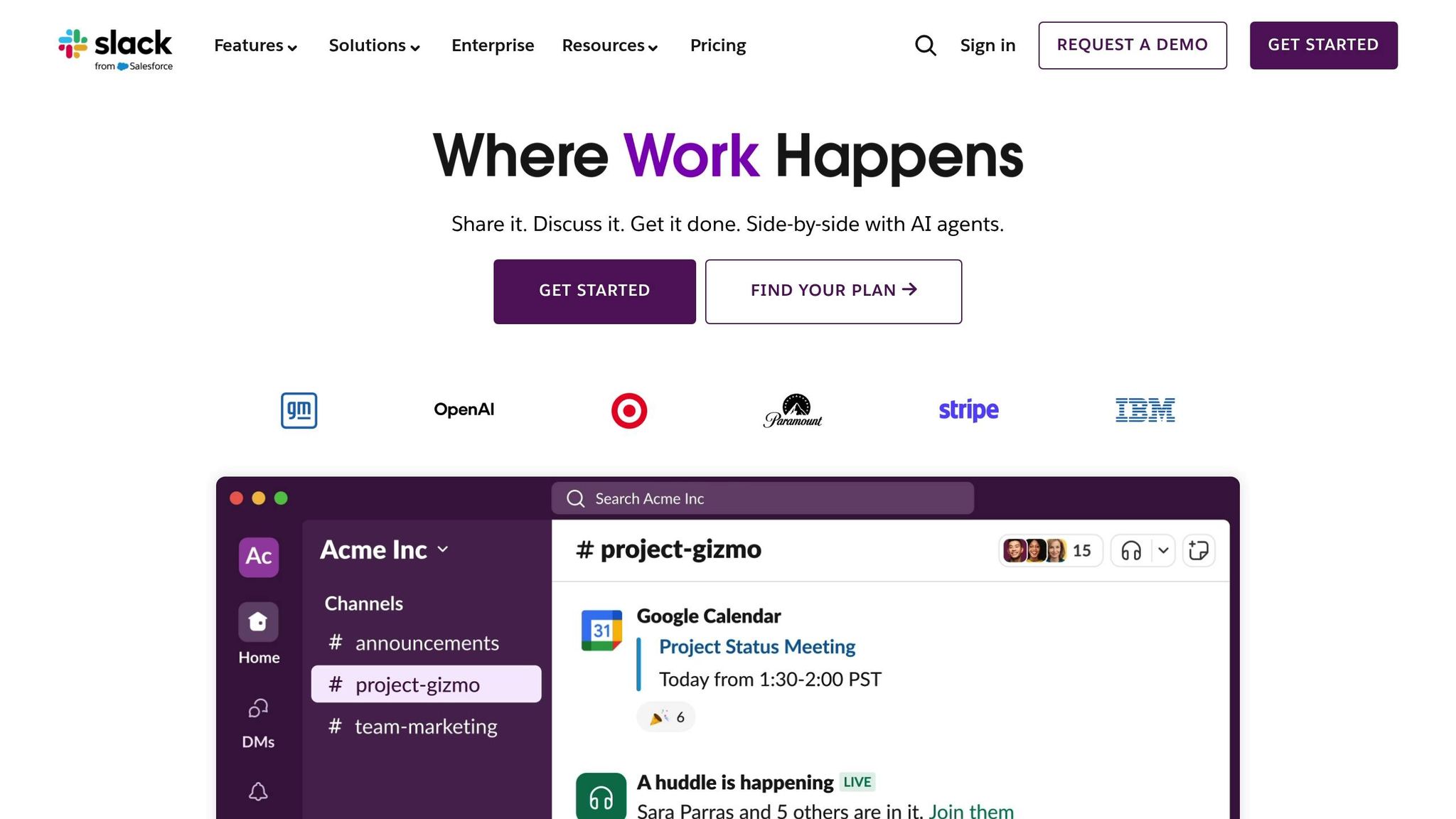
Slack AI: Productivity and Collaboration Tools
Slack AI is designed to boost team efficiency and keep everyone aligned with tools like conversation summaries, AI-driven search, and document analysis. With just one click, users can get recaps of channels, threads, and Huddles, complete with key decisions and action items [3].
The search functionality goes a step further than simple keyword matching. It offers direct citations, making it easier to verify information quickly [2]. Additionally, Slackbot analyzes shared files to highlight important trends and key data points [2].
For those on Business+ and Enterprise plans, the Channel Expert agent - powered by Salesforce's Agentforce - provides contextually relevant assistance based on the content of the channel [4][5]. Teams can also take advantage of the AI-powered Workflow Builder, where automations can be set up simply by describing them in plain language. For example, you could say, “Welcome new members to the onboarding channel,” and Slack will handle the rest [3].
These tools are further complemented by Slack’s advanced real-time search capabilities.
Real-Time Search and AI Insights
Slack’s search isn’t limited to conversations within the app. Enterprise+ users can search external platforms like Google Drive, GitHub, Salesforce, Asana, and Jira, all without leaving Slack [4]. This eliminates the need to switch between tabs, keeping workflows uninterrupted.
But Slack AI doesn’t stop at retrieving data - it interprets user intent and provides actionable insights. For instance, sales teams can ask for updates on deal statuses, and Slack AI will pull relevant information from connected systems. At Salesforce, using Slack led to a 16% reduction in meetings and a 42% drop in email volume [1], showcasing how these tools streamline communication and decision-making.
This integration with external systems highlights Slack’s growing role as a hub for enterprise collaboration, especially through its partnership with Salesforce.
Salesforce Integration and Conversational CRM
Slack’s integration with Salesforce Customer 360 exemplifies its vision for AI-driven workflows. This deep connection transforms Slack into a powerful CRM tool, allowing teams to access customer data, trigger workflows, and collaborate - all within Slack [1]. With Agentforce-powered agents, teams can automatically retrieve CRM data, manage customer interactions, and surface insights for sales efforts [2].
The integration makes enterprise workflows smoother and faster. Teams can check deal statuses, update records, and coordinate campaigns directly in Slack channels, creating a unified workspace where collaboration and customer data coexist seamlessly. This reduces delays and improves response times.
Pricing: Slack AI is available as a $10 per user/month add-on, compatible with the Pro ($8.75/user/month), Business+ ($15/user/month), and Enterprise Grid (custom pricing) plans [3].
AI in Slack – How it Works in 2024
These features demonstrate how AI improves Slack productivity by automating routine tasks and streamlining knowledge access.
General AI Tools vs. Purpose-Built Knowledge Agents
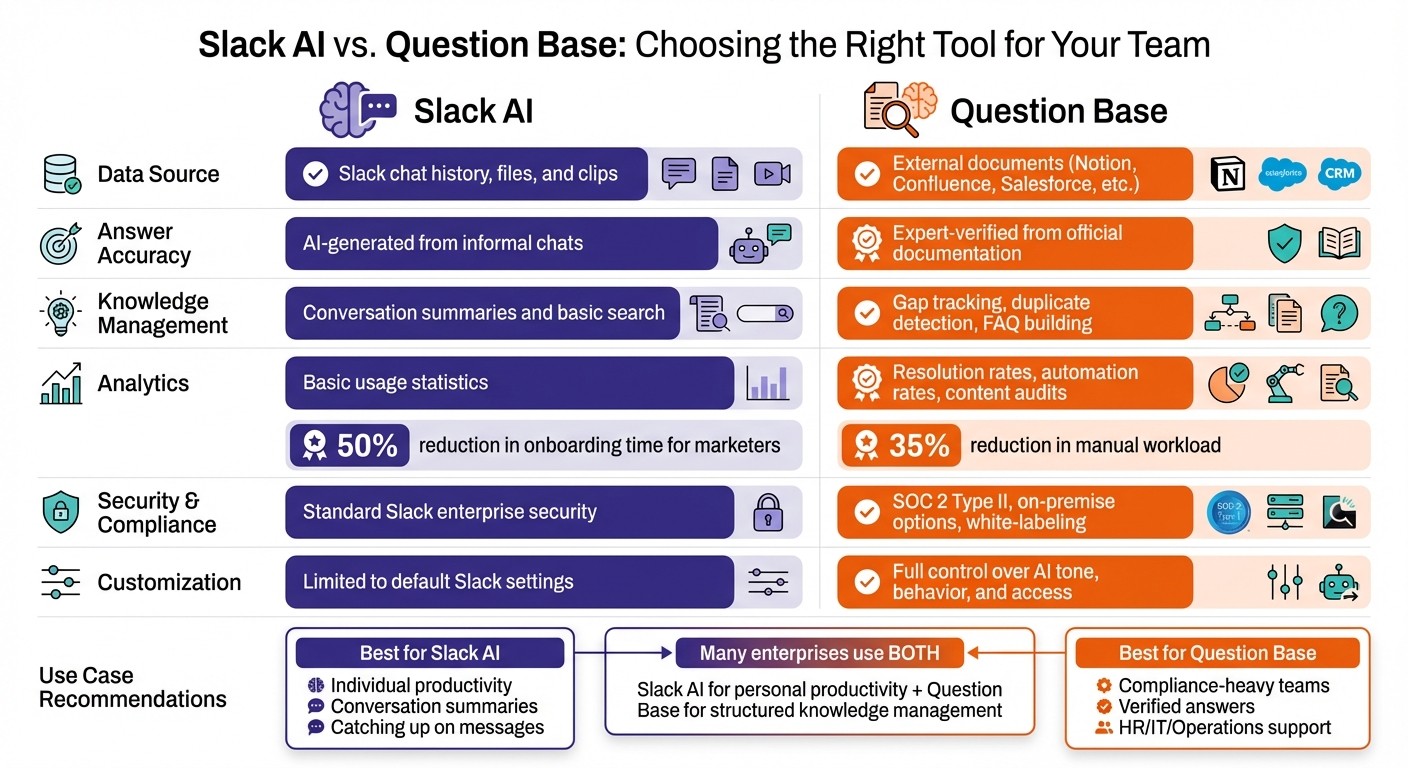
Slack AI vs Question Base Feature Comparison for Enterprise Teams
This comparison highlights Slack's ambition to serve as a Conversational OS while showing how specialized AI tools can elevate enterprise operations.
When Slack AI Shines
Slack AI is designed to boost individual productivity, particularly for those catching up on missed conversations or navigating the daily flood of Slack messages. It simplifies this process by summarizing threads and surfacing key decisions, making it easier to stay informed. For example, marketers using Slack AI reported a 50% reduction in onboarding time[6], demonstrating its effectiveness in getting new hires up to speed. Its real strength lies in helping users understand what has already happened, as it relies on chat history to generate insights.
However, while Slack AI is great for personal productivity, it doesn’t always meet the needs of enterprise teams that require verified and reliable knowledge systems.
Why Enterprises Turn to Question Base for Verified Answers

Question Base complements Slack AI by addressing gaps in its functionality. Instead of relying solely on Slack’s chat history, Question Base connects directly to trusted documentation platforms like Notion, Confluence, Salesforce, and Google Drive. This is a game-changer for HR, IT, and Operations teams that need accurate, verified answers - especially for critical topics like PTO policies or software access. These teams can’t depend on AI interpretations of past conversations; they need information sourced directly from official documents.
By pulling answers from authoritative sources and verifying them through expert review, Question Base reduces manual workloads by 35% during its early use[4]. This ensures compliance-driven teams receive consistent, trustworthy answers. Additionally, Question Base identifies knowledge gaps by tracking unanswered questions, helping teams proactively address missing documentation. Monica Limanto, a customer, shared her experience:
"Question Base has exceeded our expectations - it's easy to use, intuitive and a massive time saver... We no longer have staff waiting on busy managers for an answer, Question Base is there in seconds."
Beyond providing verified answers, Question Base offers advanced analytics, tracking resolution rates, automation rates, and performing content audits. These insights help leaders pinpoint areas for improvement and ensure their knowledge systems are running efficiently.
Feature Comparison: Slack AI vs. Question Base
Feature | Slack AI | Question Base |
|---|---|---|
Data Source | Slack chat history, files, and clips | External documents (Notion, Confluence, Salesforce, etc.) |
Answer Accuracy | AI-generated from informal chats | Expert-verified from official documentation |
Knowledge Management | Conversation summaries and basic search | Gap tracking, duplicate detection, FAQ building |
Analytics | Basic usage statistics | Resolution rates, automation rates, content audits |
Security & Compliance | Standard Slack enterprise security | SOC 2 Type II, on-premise options, white-labeling |
Customization | Limited to default Slack settings | Full control over AI tone, behavior, and access |
If your focus is on individual productivity, such as summarizing conversations or finding files quickly, Slack AI is the right tool. But if your organization requires scalable internal support with verified, auditable answers - especially in compliance-heavy areas - Question Base is the better choice. Many enterprises find value in using both: Slack AI for personal productivity and Question Base for structured, reliable knowledge management in support-focused workflows.
How to Implement AI in Slack Workflows
Getting Started with Slack AI and Agent Integrations
AI tools can reshape how teams use Slack, but getting started requires a clear plan. Here's how to integrate these capabilities into your workflows.
To access Slack AI features, you’ll need a Pro, Business+, or Enterprise+ plan. These tools include thread summaries and enhanced search capabilities. For Enterprise+ users, you can connect external platforms like GitHub, Google Drive, or Jira through enterprise search connectors, allowing AI to pull insights beyond Slack’s chat history[9].
For Question Base, the process is straightforward. Begin by installing the app from the Slack App Marketplace and inviting it to your workspace using /invite @questionbase. You can customize settings for each channel, such as adjusting the AI's tone and defining escalation processes. To ensure quality, an expert-in-the-loop reviews AI-generated responses before they’re shared with users.
Start small by targeting high-traffic channels for your pilot. Train the AI to understand your internal jargon - whether it’s acronyms like OKRs or terms like PTO. Once the AI reaches a set performance benchmark, such as handling 35% of queries automatically within 30 days, expand its use to other teams.
Best Practices for Channels and Permissions
Streamlining Slack channels and permissions is essential for effective AI deployment. Create dedicated FAQ channels for specific topics, such as #ask-benefits, #ask-onboarding, or #ask-engineering, to make it easy for team members to find answers. Use role-based access controls (RBAC) to ensure AI tools only access documents and data that authorized users can view. This is particularly important for sensitive information like HR policies, financial records, or customer details stored in connected tools.
Set clear escalation rules to define when the AI should respond automatically and when it should defer to a human. For instance, let Question Base handle queries in #ask-hr autonomously but require a human mention for #exec-team discussions. Encourage users to engage with features like "Was this helpful?" buttons after receiving answers. This feedback not only improves response accuracy but also highlights gaps in your documentation. Regularly review the "Unanswered Questions" dashboard to address these gaps and strengthen your knowledge base.
With well-defined permissions and escalation processes in place, your team will be ready to scale AI usage across the organization.
Scaling AI: From Pilot to Enterprise Rollout
Once your pilot is successful, scaling AI across the enterprise requires a structured approach. Begin by expanding into areas like onboarding and file sharing, using insights from your pilot to guide the rollout[10]. Slack’s analytics can help you track adoption rates, resolution times, and the percentage of queries handled automatically. Many teams report a 35% drop in manual workload within the first month of implementing AI-powered answer agents[4], highlighting the efficiency gains these systems bring.
To ensure smooth adoption, provide training through Slack Huddles or dedicated channels where employees can ask questions about the AI tools. Establish a feedback loop by reviewing analytics monthly. Look for trends in the questions the AI handles well and identify areas where human intervention is still needed. As Slack moves toward a more integrated "agentic OS" model that blends human and AI collaboration[7][8], your knowledge systems should evolve in tandem. This adaptability will help your team stay ahead as workflows continue to transform.
Conclusion: The Future of Work with Slack and AI
Key Takeaways for Enterprises
Slack has grown far beyond its roots as a simple messaging platform, transforming into what can be described as a Conversational OS. This shift allows enterprises to streamline workflows and manage knowledge more effectively. By integrating over 2,600 business tools into one interface[11], Slack creates a collaborative space where AI agents, human teams, and connected applications work together efficiently.
To make the most of Slack, enterprises should focus on using the right kind of AI for the right purpose. Slack AI is ideal for personal productivity tasks like summarizing threads, catching up on conversations, or pulling insights from chat history. However, when it comes to managing verified knowledge at scale, tools like Question Base step in, pulling trusted data directly from platforms such as Notion, Confluence, and Salesforce.
Organizing conversations into searchable knowledge ensures that essential expertise remains accessible, even when key team members are unavailable. This approach safeguards institutional knowledge while setting the stage for how Slack's evolving AI tools will continue to shape workplace efficiency.
What's Next for Slack's Conversational OS
Slack’s vision for its Work OS continues to expand, with AI agents becoming increasingly capable of leveraging conversational context to make decisions and coordinate tasks across connected applications[7][8]. Features like the conversation history API and data access API enable these agents to assess when to act independently and when to defer to human input[7]. This creates an environment where AI functions as a collaborative partner, not just an automation tool.
Forward-thinking organizations are using AI to enhance expertise, reduce decision fatigue, and keep teams aligned across departments and time zones. Whether it’s native Slack AI for quick insights or specialized agents for complex internal processes, the end goal is clear: transforming conversations into scalable, actionable knowledge.
FAQs
How does integrating Salesforce enhance Slack's AI features?
Integrating Salesforce with Slack brings a new level of efficiency by embedding Salesforce's CRM tools directly into Slack. This setup allows teams to quickly access customer data, update records, and receive real-time insights - all through natural language interactions. The result? Faster, smoother workflows that feel intuitive.
With features like Agentforce AI, Salesforce leverages its AI capabilities to deliver key insights and actionable steps right inside Slack conversations. This integration essentially turns Slack into a conversational CRM hub, enhancing teamwork and enabling smarter, more efficient decisions across the board.
How does Question Base compare to Slack AI for enterprise teams?
Slack AI and Question Base cater to distinct needs within enterprise environments. Slack AI is designed to boost individual efficiency by summarizing conversations and pulling information from Slack messages and files. It’s a handy tool for quick lookups and gaining insights directly from chat-based interactions.
Question Base, however, is tailored for robust knowledge management at the enterprise level. It integrates seamlessly with trusted platforms like Notion, Confluence, and Salesforce to deliver verified answers - not just chat-based summaries. Its advanced capabilities, including knowledge gap tracking, duplicate detection, and compliance controls, make it a go-to solution for teams that emphasize accuracy, governance, and maintaining reliable documentation.
If your team needs a tool for casual, fast searches, Slack AI is a practical option. But for managing structured, authoritative knowledge at scale, Question Base stands out as the smarter choice.
How does Slack AI help reduce the need for meetings and emails in the workplace?
Slack AI cuts down on meetings and emails by summarizing conversations and quickly pulling relevant details from Slack's chat history. This keeps everyone informed without the need for drawn-out discussions or constant follow-ups.
For teams that rely on verified answers and organized knowledge management, tools like Question Base take it a step further. By integrating directly with trusted sources like Notion, Confluence, or Salesforce, Question Base delivers accurate, consistent responses. This reduces repetitive communication and helps teams stay aligned and efficient.