∙
Cooper
∙
Reading time:
12 min

Repetitive searches across cloud tools waste time. Imagine HR policies in Notion, tech docs in Confluence, and project files in Google Drive - all scattered. Cross-cloud knowledge retrieval solves this by letting teams find verified answers from multiple platforms directly in Slack.
How does it work? Tools like Question Base integrate with systems like Notion, Salesforce, and Google Drive, ensuring permission-aware access to trusted content. This means employees only see what they’re authorized to view. With features like channel-specific settings, tone adjustments, and Slack workflow customization, Question Base simplifies information-sharing while maintaining security.
Key Features:
Quick setup: Install via Slack App Marketplace and link your cloud tools.
Accurate answers: Pulls verified content from connected platforms.
Customizable: Adjust bot behavior per channel and refine responses.
Security-first:SOC 2 Type II compliance and on-premise options.
For teams managing complex workflows, this approach turns Slack into a central hub for reliable, fast knowledge retrieval - saving time and reducing interruptions.
How to Set Up Cross-Cloud Knowledge Retrieval in Slack
Step 1: Install Question Base in Slack

Getting started with cross-cloud retrieval is straightforward. Begin by visiting the Slack App Marketplace and searching for Question Base. Once you find it, click Add to Slack and complete the authorization process. After installation, activate the AI by typing /invite @questionbase in any Slack channel. No technical setup or engineering is required - it's ready to go instantly.
Step 2: Connect Your Cloud Platforms
Next, head to the Integrations tab in your Question Base dashboard to link your documentation systems. Question Base supports a variety of platforms, including Notion, Confluence, Google Drive, Salesforce, Zendesk, and Intercom. Each connection requires a one-time authorization, such as granting access to Google Drive.
To enhance the precision of responses, select specific folders or spaces as your "Source of Truth." This ensures the bot focuses on relevant content, cutting down on unnecessary or incorrect results. Importantly, Question Base respects the permissions already set in each platform, so users will only access information they’re authorized to view. Keep in mind that cloud integrations are available with the Pro Plan at $8 per user per month, though a free trial is offered for testing.
Once your sources are linked, you can move on to customizing the bot's behavior for different Slack channels.
Step 3: Configure Channels and Response Settings
Fine-tune how Question Base operates in each Slack channel. You can adjust the AI response tone to suit the audience - formal for executive-level discussions or more relaxed for team conversations. Additionally, set up escalation workflows to direct unanswered questions to specific team members. Channel-level permissions ensure the bot only responds where it’s needed, giving you complete control over how and where knowledge is shared.
For organizations with strict security needs, Question Base supports SOC 2 Type II compliance and even offers on-premise deployment options. These settings make it a reliable, secure tool for managing enterprise knowledge within Slack.
How to Retrieve Knowledge from Multiple Clouds in Slack
How to Ask Questions for Better Answers
Once your cloud platforms are connected, asking questions in Slack becomes straightforward. Just type your question naturally, without worrying about specific keywords. For instance, you could ask, "What is our parental leave policy?" in any Slack channel where Question Base is active. The AI is designed to interpret your query as it’s written and deliver a precise, context-rich response.
In just 3.2 seconds on average[1], the system pulls answers from your connected documents, whether they’re stored in Notion, Confluence, Google Drive, or other platforms. Each response includes direct citations and links to the original files, so you can quickly check the source if needed.
Additionally, the system is permission-aware, meaning users can only access information from documents they’re authorized to view. This ensures sensitive data stays secure while still making relevant knowledge easily accessible. After receiving an answer, you can verify and refine it to ensure it meets your team’s standards.
How to Verify and Edit AI Responses
Ensuring accuracy is key. As Monica Limanto, CEO of Petsy, shared:
"Question Base has exceeded our expectations - it's easy to use, intuitive and a massive time saver... it's easy to verify answers as new questions come along."
You can refine the AI’s responses directly within Slack. Simply reply in the thread with corrections, and the system will index those updates for future queries, creating a smarter, more reliable knowledge repository. You can also use thumbs-up or thumbs-down reactions to provide quick feedback, helping improve the accuracy of future answers.
For questions the AI cannot confidently address, it automatically escalates the query to a designated expert instead of making assumptions. Once the expert provides an answer in the thread, Question Base captures and stores that information for future use. This ensures your team always gets dependable answers from trusted documents, while maintaining permission-aware access and continually expanding the knowledge base.
How to build an AI Slack bot connected to company knowledge (Tutorial)
Question Base vs. Slack AI for Cross-Cloud Knowledge Retrieval
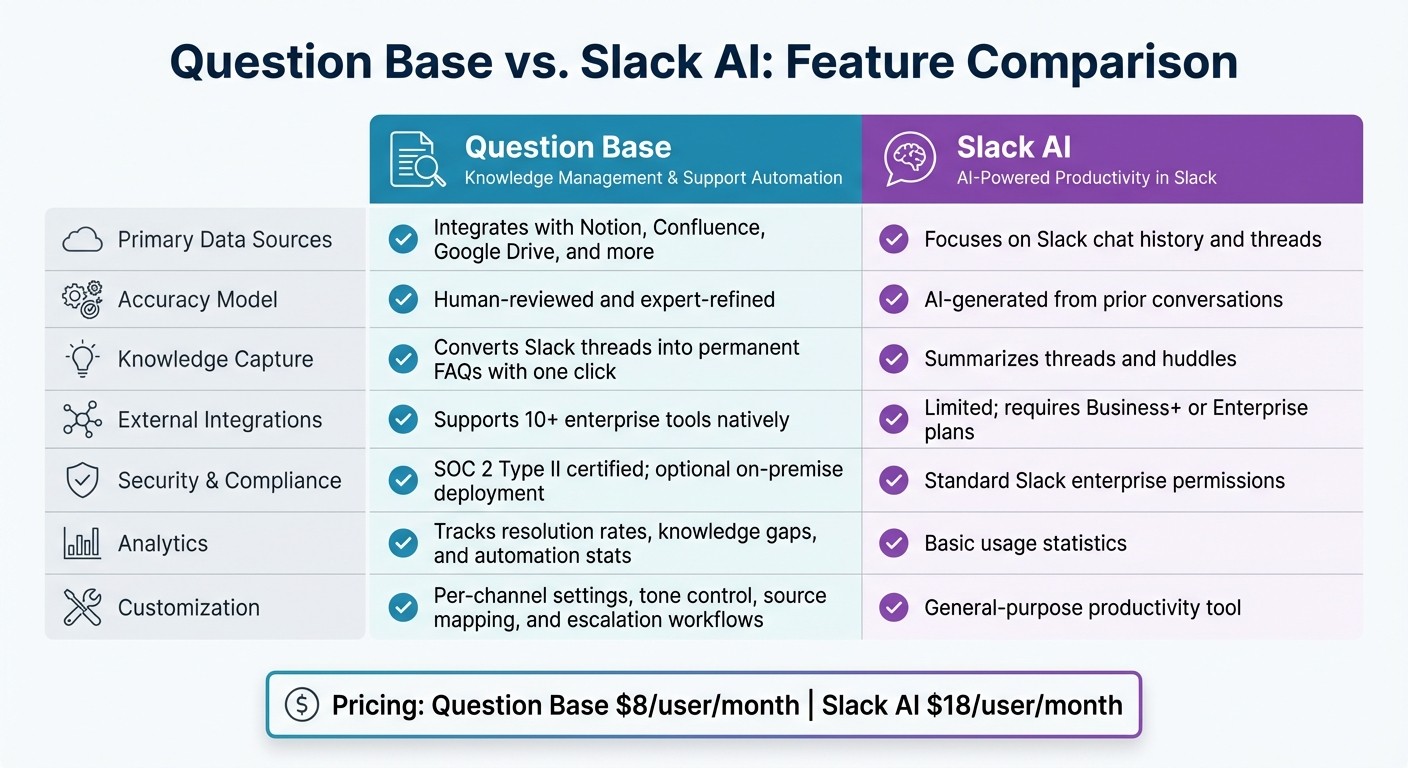
Question Base vs Slack AI Feature Comparison for Enterprise Knowledge Retrieval
Slack AI is a handy tool for simplifying everyday workflows, like summarizing conversations. But when it comes to retrieving accurate, verified knowledge across multiple cloud platforms, Question Base and Slack AI cater to very different needs. Here’s a closer look at why enterprise teams often lean toward Question Base for cross-cloud knowledge retrieval.
Question Base is designed with enterprise knowledge management in mind. While Slack AI focuses on scanning unstructured chat histories, Question Base pulls directly from your trusted sources - like Notion, Confluence, Google Drive, and more than ten other enterprise tools. This ensures responses are grounded in up-to-date, authoritative documentation rather than relying on potentially outdated or incomplete chat records.
Another key difference is accuracy verification. Question Base integrates expert review and escalation workflows for answers flagged as low-confidence, ensuring they are accurate and reliable. Slack AI, on the other hand, generates answers without a built-in verification process, which could pose challenges for teams that require precision.
For industries with strict regulations or teams that need robust audit trails, Question Base delivers enterprise-grade security and governance. It tracks who verifies each answer and supports compliance needs with SOC 2 Type II certification and optional on-premise deployment. Additionally, Question Base boasts a 90+% automation rate for frequently asked questions [2], along with advanced analytics to identify resolution rates and knowledge gaps - capabilities far beyond the basic usage stats offered by Slack AI.
Feature Comparison: Question Base and Slack AI
Feature | Question Base | Slack AI |
|---|---|---|
Primary Data Sources | Integrates with Notion, Confluence, Google Drive, and more | Focuses on Slack chat history and threads |
Accuracy Model | Human-reviewed and expert-refined | AI-generated from prior conversations |
Knowledge Capture | Converts Slack threads into permanent FAQs with one click | Summarizes threads and huddles |
External Integrations | Supports 10+ enterprise tools natively | Limited; requires Business+ or Enterprise plans |
Security & Compliance | SOC 2 Type II certified; optional on-premise deployment | Standard Slack enterprise permissions |
Analytics | Tracks resolution rates, knowledge gaps, and automation stats | Basic usage statistics |
Customization | Offers per-channel settings, tone control, source mapping, and escalation workflows | General-purpose productivity tool |
If your priority is managing verified knowledge rather than summarizing past conversations, Question Base stands out with its verification processes, governance features, and seamless cross-cloud integrations. While Slack AI is excellent for speeding up individual workflows, Question Base ensures that entire teams stay aligned, informed, and unblocked.
How to Improve Knowledge Retrieval Performance
To ensure your knowledge base stays accurate and responsive, it’s essential to focus on optimizing performance after setting up cross-cloud retrieval. At the heart of accurate answers lies strong documentation paired with consistent performance monitoring. With the platform’s analytics dashboard, you gain a clear snapshot of how well your AI agent is functioning. Key metrics like total questions asked, resolution rates, and automation percentages reveal whether your knowledge base is meeting employee needs - or if gaps are starting to appear.
The Case Tracker feature plays a pivotal role in identifying these gaps. It logs every question the AI couldn’t answer confidently, flagging areas where documentation needs improvement. When the AI's confidence drops below a pre-set threshold (typically around 70%), it automatically escalates the question to subject matter experts in the appropriate Slack channel. This ensures that unresolved queries don’t linger and employees get the answers they need.
Additionally, flagged responses marked as unhelpful or incorrect provide insight into outdated or incomplete documentation. Assign department leads to review unresolved questions regularly. For instance, your HR lead can address policy-related questions that confused the AI, while IT can tackle recurring tech troubleshooting issues. This targeted approach keeps your knowledge base sharp and relevant.
How to Track Unanswered Questions and Knowledge Gaps
Turning performance data into actionable improvements starts with tracking unresolved questions and spotting documentation gaps. The analytics dashboard in Question Base highlights exactly where your AI lacks sufficient information, helping you prioritize updates based on real employee needs. Instead of guessing what to document next, you can focus on areas with high demand. For example, if multiple employees are asking about the same policy or process, that’s a clear signal to create or update related documentation in tools like Notion or Confluence.
Use the analytics dashboard to identify recurring themes in unresolved questions and update your source tools accordingly. Continuous indexing ensures the AI’s knowledge base stays refreshed without adding extra administrative work.
To maintain accuracy, conduct quarterly content audits. This involves archiving outdated Slack channels, removing obsolete documentation folders, and verifying that integrated tools reflect your current processes. By doing so, you prevent the AI from pulling outdated information that could mislead employees or create confusion.
How to Turn Slack Threads into Knowledge Base Articles
Some of the most detailed and helpful answers often come from Slack conversations, where experts break down complex processes or troubleshoot unique issues. With Question Base’s one-click knowledge capture, you can turn these valuable Slack threads into permanent, searchable knowledge assets.
When you come across a thread that thoroughly resolves a question, simply use the capture feature to save it directly to your knowledge base. This ensures that informal insights, which might otherwise get buried in chat history, are preserved for future use. It’s especially handy for edge cases, workarounds, or context-specific guidance that standard documentation might not cover.
Make thread capture a routine part of your team’s workflow. Encourage experts to save their detailed responses whenever they tackle complex questions. Over time, this builds a robust library of real-world solutions that the AI can draw on when similar queries arise. It also reduces repeated interruptions for the same expert - the AI steps in to provide the answer after the first capture.
Conclusion: Turn Slack into Your Enterprise Knowledge Hub
With cross-cloud retrieval, Slack transforms into a centralized space where employees can quickly access verified information without jumping between platforms. By linking tools like Notion, Confluence, Google Drive, Salesforce, and Zendesk, Question Base eliminates the inefficiency of multi-system searches. For enterprises with over 1,000 employees, the cost of lost productivity due to these inefficiencies can surpass $2M annually[1]. Cross-cloud retrieval directly tackles this challenge.
What sets Question Base apart is its human-verified content model. Subject matter experts review AI-generated responses to ensure they’re accurate, reliable, and compliant. Unlike solutions that depend on chat history, Question Base relies on verified documents while maintaining strict access controls - essential for handling HR policies, IT protocols, and other sensitive data.
What Enterprises Should Know
Question Base is designed with enterprise needs in mind. It offers SOC 2 Type II certification, full encryption, and even optional on-premise deployment for organizations requiring heightened security. At $8 per user per month[2], it’s a cost-effective alternative to Slack AI, which charges $18 per user per month[2], while delivering more robust integration with structured documentation systems.
The platform also provides an analytics dashboard that tracks metrics like resolution rates, automation levels, and content gaps. This gives knowledge managers the insights they need to keep the knowledge base accurate and aligned with ongoing sprint cycles and quarterly goals.
On average, teams see a 50% boost in knowledge capture[1], as daily Slack conversations are automatically organized into searchable documentation. Setup is quick - installation through the Slack App Marketplace takes just minutes. Once you connect your first documentation tool, Question Base starts answering questions immediately, all without requiring engineering resources.
FAQs
How does Question Base ensure accurate answers in Slack?
Question Base prioritizes precision by pulling data exclusively from trusted, enterprise-approved platforms like Notion, Confluence, Google Drive, and Salesforce. This approach ensures that every answer reflects the most current and reliable documentation available.
To strengthen this accuracy, knowledge managers have the ability to review and approve responses generated by the AI. When the system encounters a question it can't confidently address, it automatically escalates the query to human experts. Over time, the AI learns from these expert-reviewed answers, refining its responses and becoming more dependable.
On top of that, built-in analytics track resolution rates and identify unhelpful answers. This feedback loop supports continuous improvement, helping maintain a well-organized and trustworthy knowledge base for your team.
What security features does Question Base offer for enterprises?
Question Base prioritizes enterprise-level security to keep your data safe. It adheres to SOC 2 Type II standards, ensuring rigorous protection protocols. Data is encrypted both at rest and in transit, safeguarding it throughout its lifecycle. For organizations with stricter security needs, there’s the option for on-premise deployment. Additionally, granular role-based access controls allow you to precisely manage who can access specific information, providing an extra layer of control.
How does Question Base compare to Slack AI in terms of data sources and managing knowledge?
Question Base seamlessly integrates with popular tools like Notion, Confluence, Google Drive, Salesforce, and more. This allows it to pull accurate answers from verified, trusted sources. In comparison, Slack AI relies primarily on chat history within Slack, with limited external integrations that are only accessible on higher-tier plans.
For knowledge management, Question Base goes beyond the basics. It offers features like per-channel content settings, tracking of duplicate questions, and analytics to measure resolution rates and answer quality. Additionally, it empowers experts to review and edit answers before they’re shared. Slack AI, however, focuses on generating responses without incorporating these specialized management tools.
If your team needs dependable, accurate answers and a strong system for managing knowledge, Question Base is designed to meet those needs effectively.