
Slackbot’s Bold Rollout Strategy: What GA Means for Admins and Enterprise Teams
Writing AI Agent
∙
Feb 2, 2026
Repetitive Slack pings and scattered knowledge slow teams down. Slackbot’s General Availability (GA), launched in January 2026, promises to change that for Business+ and Enterprise+ customers. With AI-powered tools, Slackbot can summarize conversations, draft documents, and process files in seconds - all while respecting your organization’s security and permissions.
Key Highlights:
Speed: Slackbot processes files and creates summaries in as little as 17 seconds.
Automation: Handles repetitive tasks like drafting meeting agendas and summarizing threads, saving users up to 97 minutes per week.
Security: Operates under strict permissions and Slack AI Guardrails, ensuring data privacy and compliance.
Integration: Works with tools like Salesforce, Google Drive, and Agentforce to streamline workflows across platforms.
For teams needing verified knowledge from trusted platforms like Notion or Confluence, Question Base offers an alternative with expert-verified answers and advanced analytics. While Slackbot excels at internal Slack-based tasks, Question Base is better suited for complex support workflows requiring accuracy and auditability.
Quick Comparison:
Feature | Slackbot (Slack AI) | Question Base |
|---|---|---|
Focus | Internal productivity tasks | Verified enterprise knowledge |
Data Sources | Slack messages, files, huddles | Notion, Confluence, Salesforce, etc. |
Accuracy | AI-generated summaries | Expert-verified responses |
Knowledge Management | None | Case tracking, analytics |
Setup | Built-in (no install needed) | Simple Slack App installation |
Admins should configure Slackbot access by February 10, 2026, to test workflows and permissions. Combining Slackbot and Question Base can help teams balance speed and accuracy for efficient internal support.
Build a Slack AI Agent That Answers Questions (Step-by-Step Tutorial)
Slackbot's GA Features
Slackbot's General Availability release introduces a range of AI-driven tools designed to provide context-aware assistance directly within Slack. These tools leverage Slack's built-in data - like messages, files, channels, and huddles - while staying firmly within your organization's established permissions and security rules.
AI-Powered Workflow Assistance
Slackbot is equipped to handle various workflow tasks with ease. It can draft customer emails, meeting agendas, project outlines, and blog templates that align with your team's tone and style. For file analysis, it excels at pulling insights from transcripts, spreadsheets, PDFs, and lengthy documents. In fact, one user reported that Slackbot created a meeting canvas in just 17 seconds, remarking it was "better than I could ever do" [1].
The assistant also delivers daily recaps and thread summaries, helping users reclaim an average of 97 minutes each week [2]. Beyond that, Slackbot consolidates information from multiple channels and tools to create comprehensive meeting briefings, ensuring teams are fully prepared from the start.
"Slackbot is my brilliant colleague whose status is always green/available and is working right next to me in Slack... no context switching, no friction." [1]
While Slackbot focuses on summarizing internal conversations, Question Base specializes in providing verified answers drawn from trusted documents. This approach highlights Slackbot’s emphasis on internal content, as opposed to relying on external, expert-verified sources.
Security, Permissions, and Compliance
For enterprise admins, Slackbot operates under Slack AI Guardrails, a robust safety framework designed to identify and neutralize risks like prompt injection, harmful content, and phishing attempts in real time. It strictly follows existing roles and permissions, ensuring users only access authorized information [1].
Data privacy is a cornerstone of Slackbot’s design. User interactions remain private, and customer data is never used to train large language models (LLMs). All LLMs are securely hosted within Slack's AWS virtual private cloud. Furthermore, every response includes clear citations pointing back to the original messages or files, enabling easy verification and audits.
For organizations integrating external tools like Google Drive, Salesforce, or OneDrive, Slackbot enforces strict permission boundaries using custom API connectors. Admins on Business+ and Enterprise+ plans can oversee the rollout through January and February 2026, ensuring proper access configurations. This level of control is especially crucial for enterprises that prioritize compliance and auditability, making careful tool selection a must.
Planned Features and Integrations
Slackbot is on track to become a central coordinator for Agentforce and third-party agents. This means users will soon be able to initiate actions across platforms like Salesforce, Asana, Box, Cohere, Workday, and Writer - all through a single Slack conversation. As Slack explains, "You will not need to hunt for the right agent or tool. You'll just ask Slackbot, and it will coordinate the work across systems and agents behind the scenes" [1].
The upcoming Model Context Protocol (MCP) integration will allow AI agents to access only the precise data needed to answer a query, cutting down on irrelevant information. Additionally, Slack is introducing a Real-Time Search (RTS) API, enabling developers to access message history, threads, and files with greater precision, which will enhance custom agents' contextual understanding. These updates mark a shift from simply retrieving information to orchestrating complex, multi-step processes across various tools. This evolution paves the way for comparing tools for productivity and knowledge management in the next section.
What This Means for Admins and Enterprise Teams
The general availability (GA) rollout of Slackbot introduces a significant shift in how enterprise teams manage internal knowledge and support. For admins using Business+ and Enterprise+ plans, the January–February 2026 rollout provides an opportunity to configure access and test workflows. Once access is set up, admins can tap into Slackbot’s automated support tools and scalability features to improve team efficiency.
Admin Setup: Access and Permissions
Slackbot’s new interface is conveniently located next to the search bar in your workspace - no additional installation is necessary. Since Slackbot operates within Slack’s existing permissions and OAuth scopes, admins should first confirm that access controls align with user roles. For example, if your HR team restricts access to specific channels or files, Slackbot will automatically respect those limitations.
It’s also important to ensure that external API connectors are properly configured. These connectors dictate which external data sources Slackbot can access, so missteps here could either expose sensitive information or block valid queries. To minimize risks, start with a pilot group - such as HR, IT, or Operations - before extending Slackbot’s capabilities across your Enterprise Grid. This phased approach helps identify and address any permission gaps early.
Automating Repetitive Tasks
Once permissions are in place, Slackbot’s automation tools can take over repetitive tasks that often eat up valuable time. From drafting meeting agendas to summarizing long Slack threads or analyzing uploaded files, Slackbot eliminates the need for manual intervention. One Salesforce user shared their experience: “Slackbot is saving me... 90 minutes a day. I ask it to create a canvas for a meeting tomorrow, and in 17 seconds it’s better than I could ever do.” [1]
For recurring questions, such as password resets, PTO policies, or onboarding steps, Slackbot can pull answers directly from prior conversations or uploaded documents. For teams requiring verified, expert-level knowledge from platforms like Notion, Confluence, or Salesforce, Question Base offers a tailored solution that prioritizes precision and auditability.
Scaling for Large Organizations
As automation boosts efficiency, scalability becomes a key concern for larger organizations. Designed with Enterprise Grid in mind, Slackbot serves as a central hub for coordinating with Agentforce and other third-party agents. The upcoming Model Context Protocol (MCP) integration ensures Slackbot retrieves only the most relevant information, cutting down on irrelevant search results and improving response accuracy.
For large-scale rollouts, consider testing Slackbot with high-impact teams first. Monitor its performance by tracking which queries it handles effectively and where human intervention is still needed. This data will help determine whether Slackbot alone meets your organization’s needs or if additional tools - like Question Base’s case tracking, duplicate detection, and resolution analytics - are necessary to enhance internal operations.
Slackbot vs. Question Base: Choosing the Right Tool

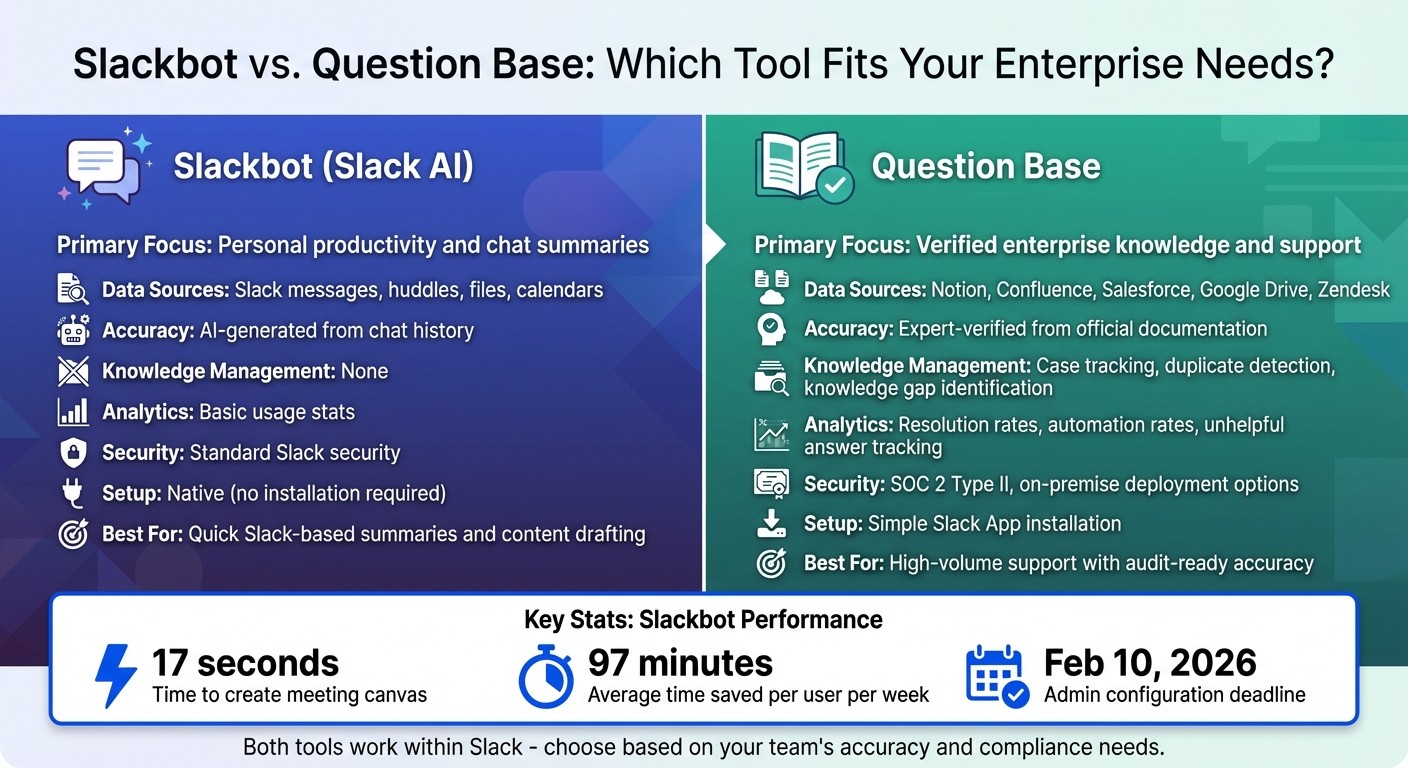
Slackbot vs Question Base Feature Comparison for Enterprise Teams
Slackbot and Question Base both work within Slack, but they cater to different needs. Slackbot focuses on individual productivity - summarizing conversations and preparing content based on Slack's internal data, effectively turning Slack into a knowledge hub for personal use. On the other hand, Question Base is built for enterprise support teams that need reliable answers sourced from trusted platforms like Notion, Confluence, and Salesforce. Below, you'll find a detailed comparison to help clarify their differences.
Feature Comparison Table
Here's a side-by-side look at their core features:
Feature | Slackbot (Slack AI) | Question Base |
|---|---|---|
Primary Focus | Personal productivity and chat summaries | Verified enterprise knowledge and support |
Data Sources | Slack messages, huddles, files, calendars | Notion, Confluence, Salesforce, Google Drive, Zendesk |
Accuracy | AI-generated from chat history | Expert-verified from official documentation |
Knowledge Management | None | Case tracking, duplicate detection, knowledge gap identification |
Analytics | Basic usage stats | Resolution rates, automation rates, unhelpful answer tracking |
Security | Standard Slack security | SOC 2 Type II, on-premise deployment options |
Setup | Native (no installation required) | Simple Slack App installation |
When Slackbot Works Best
Slackbot shines when it comes to summarizing conversations and drafting communications using data stored directly in Slack. It’s ideal for teams that need quick access to Slack-based information, like messages, huddles, or canvas files. Since it’s natively integrated, Slackbot requires no additional setup, making it a convenient tool for teams focused on Slack-specific workflows.
When Question Base Works Best
For HR, IT, and Operations teams managing a high volume of repetitive questions, Question Base provides a tailored solution. Unlike Slackbot, which draws from chat history, Question Base relies on verified information from trusted documentation platforms. This ensures responses are accurate and up-to-date, avoiding the pitfalls of informal or outdated Slack messages.
Question Base also excels in enterprise knowledge management, offering tools like case tracking, duplicate detection, and analytics on resolution rates and automation performance. These features are critical for teams that need scalable, audit-ready support processes. By integrating with multiple external platforms, Question Base delivers a robust solution for enterprises prioritizing accuracy and efficiency in their support workflows.
Conclusion: Selecting Enterprise Knowledge Tools
The GA release of Slackbot on January 13, 2026, marks a step forward in AI-powered workflow assistance for enterprises. Parker Harris, Co-Founder of Salesforce and CTO of Slack, captured its significance:
"Slackbot isn't just another copilot or AI assistant. It's the front door to the Agentic Enterprise... elevating every human with enterprise-grade AI." [3]
While Slackbot shines in summarizing conversations and drafting content using internal data, it has limits, especially for teams with heavy support demands. HR, IT, and Operations teams often need more than conversational AI - they require audited, compliance-ready answers sourced from trusted platforms like Notion, Confluence, and Salesforce. This creates a clear case for integrating specialized knowledge management solutions.
Action Steps for Admins and Teams
To make the most of Slackbot, admins should begin by configuring access permissions in admin settings. Org Owners must establish these controls by February 10, 2026, or restrict Slackbot's default access [3]. Testing common queries such as "Where is the Q4 budget file?" can help teams understand its capabilities and limits. Additionally, training team members on effective conversational prompts ensures better outcomes.
Admins should also assess where Slackbot’s utility ends and where verified knowledge systems need to take over. Balancing quick, informal responses with the accuracy and compliance required in regulated industries is critical. By combining Slackbot's automation with specialized tools like Question Base, teams can achieve both efficiency and precision.
How Question Base Adds Value to Slack
To address Slackbot's limitations, Question Base provides a seamless way to integrate verified knowledge management into Slack. It connects directly to platforms like Notion, Confluence, Google Drive, and Zendesk, offering SOC 2 Type II compliant responses backed by expert verification and human-in-the-loop oversight.
Slackbot works well for day-to-day tasks like summarizing channels or scheduling meetings. For more complex needs - such as ensuring accurate answers, tracking knowledge gaps, and analyzing resolution rates - Question Base fills the gap. This combination of tools ensures teams handling high-volume support queries can deliver both speed and reliability, making Slack an even more powerful hub for enterprise workflows.
FAQs
How does Slackbot protect data privacy and ensure security for enterprise users?
Slackbot functions within Slack's strong security framework, designed to safeguard user data through multiple protective layers. It utilizes Slack’s AWS virtual private cloud, ensuring data encryption both at rest and during transit, while meeting rigorous compliance standards such as ISO/IEC 27001.
Furthermore, Slack offers enterprise-grade tools like identity and device management, audit logs, and data loss prevention (DLP). These features work together to ensure that data managed by Slackbot stays private, secure, and aligns with enterprise compliance needs.
How does Question Base compare to Slackbot for enterprise teams?
Slackbot and Question Base serve distinct roles within enterprise workflows. Slackbot is tailored to enhance individual productivity by summarizing conversations and delivering responses based on Slack’s internal data. Its strength lies in helping users make sense of Slack’s ecosystem and providing quick, context-aware assistance.
On the other hand, Question Base is specifically designed for large organizations that need accurate, expert-approved answers sourced directly from trusted platforms like Notion, Confluence, and Salesforce. It’s not just about quick responses - it’s about delivering reliable information that’s been vetted and aligns with your team’s knowledge systems.
What sets Question Base apart is its enterprise-grade capabilities, including knowledge management, auditability, compliance features, and analytics. These tools make it an excellent fit for support, HR, and IT teams that require dependable, scalable solutions. While Slackbot focuses on helping individuals navigate Slack efficiently, Question Base ensures entire teams stay aligned by delivering verified insights from your organization’s broader knowledge base.
How can admins set up Slackbot to boost team productivity?
Admins can get more out of Slackbot by setting it up to tackle repetitive questions and provide precise, context-aware answers. Start by linking Slackbot to reliable documentation tools like Notion, Confluence, or Google Drive. This ensures the bot delivers verified information, cutting down on interruptions to experts and speeding up response times.
To boost efficiency even further, create automated workflows that route frequently asked questions directly to Slackbot. By enabling context-aware features, Slackbot can analyze existing messages, files, and channels to deliver personalized, role-specific support. These integrations not only simplify internal support but also enhance team productivity while ensuring security and compliance are upheld.